
Toyota Venza: Reassembly
REASSEMBLY
PROCEDURE
1. INSTALL FRONT OIL PUMP OIL SEAL
|
(a) Using SST and a hammer, install a new oil seal to the oil pump body. SST: 09350-32014 09351-32140 Oil seal driven in depth: -0.25 to 0.25 mm (-0.00984 to 0.00984 in.) |
|
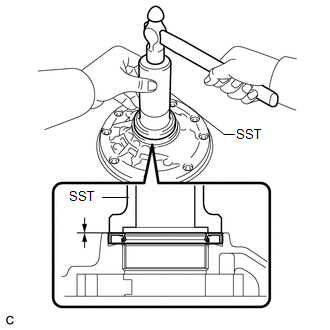
(b) Coat the lip of the oil seal with MP grease.
2. INSTALL FRONT OIL PUMP BODY O-RING
|
(a) Coat a new O-ring with ATF and install it to the oil pump body. NOTICE: Ensure that the O-ring is not twisted. |
|
.png)
3. INSTALL FRONT OIL PUMP DRIVEN GEAR
|
(a) Coat the front oil pump driven gear with ATF and install it to the oil pump body with the marked side up. |
|
.png)
4. INSTALL FRONT OIL PUMP DRIVE GEAR
|
(a) Coat the front oil pump drive gear with ATF, and install it to the oil pump body with the marked side up. |
|
.png)
5. INSTALL STATOR SHAFT ASSEMBLY
|
(a) Align each knock pin of the stator shaft with the holes in the oil pump body and install the stator shaft to the oil pump body. |
|
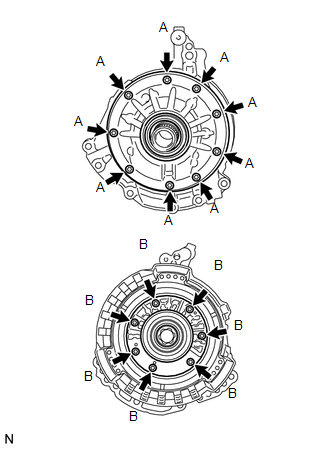
(b) Using a "TORX" socket (T30), install the 16 bolts.
Torque:
9.3 N·m {95 kgf·cm, 82 in·lbf}
| - | Bolt Length |
|---|---|
| Bolt A |
14 mm (0.551 in.) |
| Bolt B |
26 mm (1.02 in.) |
6. INSPECT FRONT OIL PUMP AND GEAR BODY SUB-ASSEMBLY
.gif)
 Inspection
INSPECTION
PROCEDURE
1. INSPECT FRONT OIL PUMP AND GEAR BODY SUB-ASSEMBLY
(a) Turn the drive gear with 2 screwdrivers and make sure that it rotates
smoothly.
NOTICE:
Be careful ...

Other materials about Toyota Venza:
Installation
INSTALLATION
PROCEDURE
1. INSTALL WINDSHIELD WIPER SWITCH ASSEMBLY
(a) Engage the claw to install the windshield wiper switch assembly as
shown in the illustration.
(b) Connect the 2 connectors. ...
Terminals Of Ecu
TERMINALS OF ECU
1. CHECK MAIN BODY ECU (DRIVER SIDE JUNCTION BLOCK ASSEMBLY)
(a) Disconnect the 2A and 2F main body ECU (driver side junction block assembly)
connectors.
(b) Measure the voltage and resistance according to the value(s) in the table
be ...
Precaution
PRECAUTION
1. PRECAUTION FOR VEHICLE WITH SRS AIRBAG AND SEAT BELT PRETENSIONER
(a) Some operations in this section may affect the SRS airbags. Prior to performing
the corresponding operations, read the precautions regarding the SRS airbags (See
page ). ...

0.1294