
Toyota Venza: Removal
REMOVAL
PROCEDURE
1. REMOVE POWER DISTRIBUTION
|
(a) Remove the bolt. |
|
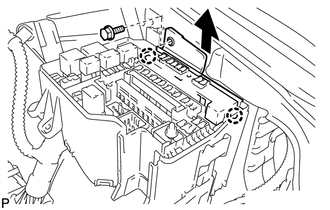
(b) Disengage the 2 claws and disconnect the power distribution from the relay box as shown in the illustration.
|
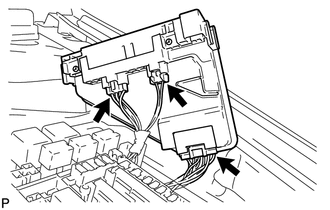
(c) Disconnect the 3 connectors and remove the power distribution. |
|
 Inspection
INSPECTION
PROCEDURE
1. INSPECT INTEGRATION RELAY
(a) Inner circuit (for 2GR-FE)
(1) for EFI MAIN relay
Measure the resistance according to the value(s) in the table
...
 Installation
INSTALLATION
PROCEDURE
1. INSTALL POWER DISTRIBUTION
(a) Connect the 3 connectors.
(b) Engage the 2 claws to temporarily instal ...
Other materials about Toyota Venza:
Rear Stabilizer Bar(for 2wd)
Components
COMPONENTS
ILLUSTRATION
ILLUSTRATION
Removal
REMOVAL
PROCEDURE
1. REMOVE REAR WHEELS
2. REMOVE REAR STABILIZER LINK ASSEMBLY LH
(a) Remove the nut and separate the rear stabilizer link assembly LH
from the rear stabil ...
Rear Airbag Sensor LH Circuit Malfunction (B1635/24)
DESCRIPTION
The side collision sensor LH circuit (to determine deployment of the front seat
side airbag assembly LH and curtain shield airbag assembly LH) is composed of the
center airbag sensor assembly, rear airbag sensor LH and side airbag sensor LH.
...
Lost Communication with AFS LIN (B124D)
DESCRIPTION
The DTC is stored when the main body ECU (driver side junction block assembly)
detects malfunctions in the LIN communication system.
DTC No.
DTC Detection Condition
Trouble Area
B124D
...

0.1279