
Toyota Venza: Installation
INSTALLATION
PROCEDURE
1. INSTALL POWER DISTRIBUTION
|
(a) Connect the 3 connectors. |
|
.png)
|
(b) Engage the 2 claws to temporarily install the power distribution as shown in the illustration. |
|
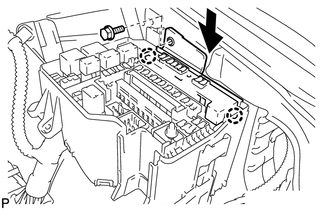
(c) Install the power distribution with the bolt.
 Removal
REMOVAL
PROCEDURE
1. REMOVE POWER DISTRIBUTION
(a) Remove the bolt.
(b) Disengage the 2 claws and disconnect the power distribution from t ...
 Main Body Ecu
Components
COMPONENTS
ILLUSTRATION
Removal
REMOVAL
PROCEDURE
1. REMOVE UPPER INSTRUMENT PANEL
HINT:
Refer to the procedure up to Remove Upper Instrument Panel Sub-assembly (See
page ) ...
Other materials about Toyota Venza:
Vehicle Speed Sensor Malfunction (B2415)
DESCRIPTION
The AFS ECU (headlight swivel ECU assembly) receives signals indicating the front
right wheel speed from the skid control ECU using CAN communication.
DTC No.
DTC Detection Condition
Trouble Area
...
ECU Version Miss Match (C1288/88)
DESCRIPTION
DTC Code
DTC Detection Condition
Trouble Area
C1288/88
ECM does not match.
ECM
PROCEDURE
1.
CHECK CAN COMMUNICATION SYSTEM
(a) Chec ...
Solar Sensor
Components
COMPONENTS
ILLUSTRATION
On-vehicle Inspection
ON-VEHICLE INSPECTION
PROCEDURE
1. INSPECT SOLAR SENSOR
(a) Disconnect the solar sensor connector.
(b) Measure the voltage accordin ...

0.1484