
Toyota Venza: Reassembly
REASSEMBLY
PROCEDURE
1. INSTALL MULTIPLEX NETWORK DOOR ECU
|
(a) Connect the connector and install the multiplex network door ECU. |
|
.png)
|
(b) Install the flat cable connector as shown in the illustration. |
|
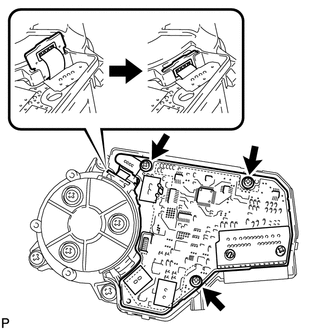
(c) Install the 3 screws.
|
(d) Engage the 4 claws to install the cover. |
|
.png)
 Disassembly
DISASSEMBLY
CAUTION / NOTICE / HINT
NOTICE:
When disassembling the multiplex network door ECU, eliminate static electricity
by touching the vehicle body to prevent the components from being damag ...
 Installation
INSTALLATION
PROCEDURE
1. INSTALL POWER BACK DOOR UNIT ASSEMBLY
(a) Install the power back door unit with the 4 bolts.
Torque:
13 N·m {133 kgf·cm, 10 ft·lbf}
...
Other materials about Toyota Venza:
Trip information
Display items can be switched by pressing the “INFO” button.
- Average Fuel Economy
Displays the average fuel consumption since the function was reset.
• The function can be reset by pressing and holding the “SELECT RESET” button
when the ...
Precaution
PRECAUTION
HINT:
In the airbag system, the front airbag sensor, door side airbag sensor
and rear airbag sensor are collectively referred to as the airbag sensors.
The steering pad, driver side knee airbag assembly, front passenger
airb ...
Sound of Portable Player cannot be Heard from Speakers or Sound is Low
PROCEDURE
1.
CHECK PORTABLE PLAYER SETTINGS
(a) Check the portable player settings.
(1) Check that the volume is not set to "0".
(2) Check that mute is off.
(b) Check that the sound of the portable player can be h ...

0.1199