
Toyota Venza: Installation
INSTALLATION
PROCEDURE
1. INSTALL SEPARATE TYPE FRONT SEATBACK COVER
|
(a) Using a tacker, install the separate type front seatback heater to the end of the separate type front seatback cover with 12 new tack pins. NOTICE: Be careful not to damage the cushion. |
|
.png)
|
(b) Using hog ring pliers, install the separate type front seatback cover with 10 new hog rings. Text in Illustration
NOTICE:
|
|
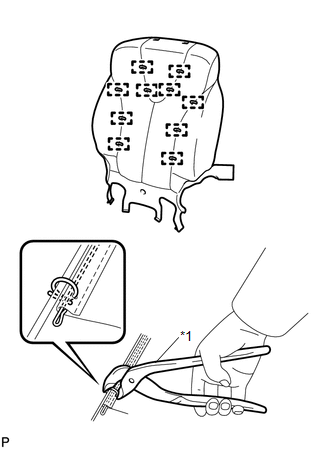
2. INSTALL SEPARATE TYPE FRONT SEATBACK COVER WITH PAD
.gif)
3. INSTALL FRONT SEATBACK BOARD SUB-ASSEMBLY
4. INSTALL SEPARATE TYPE FRONT SEAT CUSHION COVER WITH PAD
5. INSTALL FRONT INNER SEAT CUSHION SHIELD
6. INSTALL FRONT SEAT INNER BELT ASSEMBLY
7. INSTALL POWER SEAT SWITCH
8. INSTALL FRONT SEAT CUSHION SHIELD ASSEMBLY
9. INSTALL SLIDE AND VERTICAL POWER SEAT SWITCH KNOB
10. INSTALL RECLINING POWER SEAT SWITCH KNOB
11. INSTALL FRONT SEAT ASSEMBLY
12. INSTALL FRONT SEAT REAR INNER TRACK COVER
13. INSTALL FRONT SEAT REAR OUTER TRACK COVER
14. INSTALL FRONT SEAT HEADREST ASSEMBLY
15. INSPECT FRONT SEAT ASSEMBLY
16. INSPECT SRS WARNING LIGHT
(See page )
 Inspection
INSPECTION
PROCEDURE
1. INSPECT FRONT SEATBACK HEATER LH
(a) Apply battery voltage and check the seatback heater.
OK:
Measurement Connection
Cond ...

Other materials about Toyota Venza:
Dtc Check / Clear
DTC CHECK / CLEAR
1. CHECK DTC
(a) Connect the Techstream to the DLC3.
(b) Turn the ignition switch to ON.
(c) Turn the Techstream on.
(d) Enter the following menus: Body Electrical / Smart Key. Main Body or Power
Source Control / Trouble Codes.
(e) Ch ...
Customize Parameters
CUSTOMIZE PARAMETERS
1. CUSTOMIZING FUNCTION WITH TECHSTREAM (REFERENCE)
HINT:
When the customer requests a change in a function, first make sure that
the function can be customized.
Be sure to make a note of the current settings before cust ...
Diagnosis System
DIAGNOSIS SYSTEM
1. DESCRIPTION
(a) Sliding roof system data and Diagnostic Trouble Codes (DTCs) can be read
through the vehicle Data Link Connector 3 (DLC3). When the system seems to be malfunctioning,
use the Techstream to check for malfunctions and pe ...

0.1437