
Toyota Venza: Installation
INSTALLATION
PROCEDURE
1. INSTALL POWER OUTLET SOCKET COVER NO.1
|
(a) Engage the 2 claws to install the power point socket cover. |
|
.png)
2. INSTALL POWER POINT SOCKET ASSEMBLY
|
(a) Engage the 2 claws to install the power point socket assembly as shown in the illustration. |
|
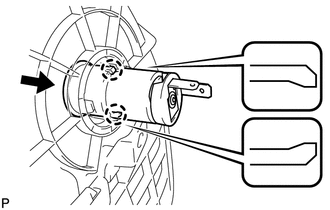
3. INSTALL CONSOLE BOX SUB-ASSEMBLY
.gif)
4. INSTALL POSITION INDICATOR HOUSING ASSEMBLY
5. INSTALL SHIFT LEVER KNOB SUB-ASSEMBLY
6. INSTALL LOWER INSTRUMENT PANEL SUB-ASSEMBLY
7. INSTALL NO. 2 INSTRUMENT PANEL UNDER COVER SUB-ASSEMBLY
8. INSTALL COWL SIDE TRIM SUB-ASSEMBLY RH
9. INSTALL FRONT DOOR SCUFF PLATE RH
10. INSTALL LOWER NO. 1 INSTRUMENT PANEL FINISH PANEL
11. INSTALL COWL SIDE TRIM SUB-ASSEMBLY LH
12. INSTALL FRONT DOOR SCUFF PLATE LH
13. INSTALL AIR CONDITIONING CONTROL ASSEMBLY
14. INSTALL CONSOLE BOX ASSEMBLY
15. INSTALL NO. 2 CONSOLE BOX CARPET
16. INSTALL UPPER CONSOLE PANEL SUB-ASSEMBLY (w/o Seat Heater System)
17. INSTALL UPPER CONSOLE PANEL SUB-ASSEMBLY (w/ Seat Heater System)
 Removal
REMOVAL
PROCEDURE
1. REMOVE UPPER CONSOLE PANEL SUB-ASSEMBLY (w/o Seat Heater System)
2. REMOVE UPPER CONSOLE PANEL SUB-ASSEMBLY (w/ Seat Heater System)
3. REMOVE NO. 2 CONSOLE BOX CARPET
...

Other materials about Toyota Venza:
System Description
SYSTEM DESCRIPTION
1. BRIEF DESCRIPTION
(a) The Control Area Network (CAN) is a serial data communication system for
real time application. It is a vehicle multiplex communication system which has
a high communication speed and the ability to detect malf ...
Removal
REMOVAL
PROCEDURE
1. REMOVE FRONT DOOR SCUFF PLATE LH
2. REMOVE COWL SIDE TRIM SUB-ASSEMBLY LH
3. REMOVE LOWER NO. 1 INSTRUMENT PANEL FINISH PANEL
4. REMOVE LOWER STEERING COLUMN COVER
(a) Turn the steering wheel assembly to the right ...
Removal
REMOVAL
PROCEDURE
1. DISCONNECT CABLE FROM NEGATIVE BATTERY TERMINAL
NOTICE:
When disconnecting the cable, some systems need to be initialized after the cable
is reconnected (See page ).
2. REMOVE REAR DOOR INSIDE HANDLE BEZEL PLUG
3. REMOVE REAR P ...

0.1134