
Toyota Venza: Side doors
The vehicle can be locked and unlocked using the entry function, wireless remote control, key or door lock switch.
- Entry function (vehicles with smart key system)
- Wireless remote control
- Key
► Vehicles with smart key system The doors can also be locked and unlocked with the mechanical key.
► Vehicles without smart key system
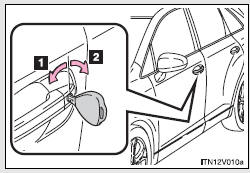
1. Locks all doors
2. Unlocks all doors
Turning the key unlocks the driver’s door. Turning the key again within 3 seconds unlocks the other doors.
- Door lock switch
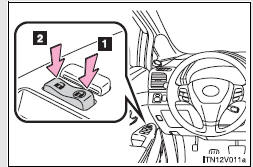
1. Locks all doors
2. Unlocks all doors
- Inside lock button
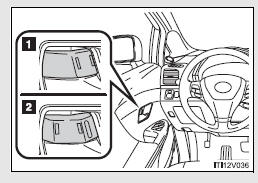
1. Locks the door
2. Unlocks the door
The front doors can be opened by pulling the inside handles even if the lock buttons are in the lock position.
- Locking the driver’s doors from the outside without a key
- Rear door child-protector lock
- Automatic door locking and unlocking systems
 Antenna location and effective range
- Antenna location
1. Antennas outside cabin
2. Antennas inside cabin
3. Antenna outside luggage compartment
- Effective range (areas within which the electronic key is detected)
...
 Locking the driver’s doors from the outside without a key
Move the inside lock button to the
lock position.
Close the door.
►Vehicles with smart key system
The door cannot be locked if the “ENGINE START STOP” switch is in ACCESSORY or IGNITI ...
Other materials about Toyota Venza:
Seat Memory Switch
Components
COMPONENTS
ILLUSTRATION
Removal
REMOVAL
PROCEDURE
1. REMOVE FRONT DOOR INSIDE HANDLE BEZEL PLUG LH
2. REMOVE POWER WINDOW REGULATOR MASTER SWITCH ASSEMBLY WITH FRONT DOOR ARMREST
BASE PANEL
3. REMOVE COURTESY LIGHT ASSEMBLY
...
Wireless Transmitter Memory Function does not Operate
DESCRIPTION
With the ignition switch off and the driver door closed, pressing the manual
lock or unlock switch on the power window regulator master switch assembly while
holding a seat memory switch (M1 switch or M2 switch) will register the transmitter
...
Fail-safe Chart
FAIL-SAFE CHART
1. HID Headlight System
(a) Light Control ECU
(1) The light control ECU stops illuminating the HID headlights when any of the
following abnormalities are detected.
Condition
Content
Open in output si ...

0.1709