
Toyota Venza: Removal
REMOVAL
PROCEDURE
1. REMOVE REAR BUMPER ASSEMBLY
(See page .gif) )
)
2. REMOVE ULTRASONIC SENSOR CLIP
|
(a) Disconnect the connector. Text in Illustration
|
|
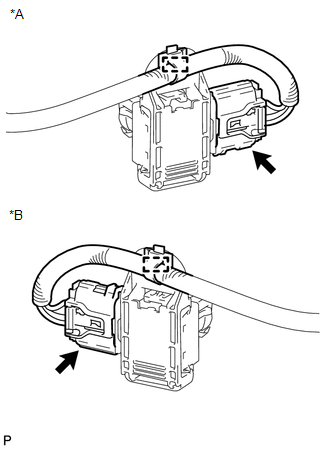
(b) Disengage the clamp.
|
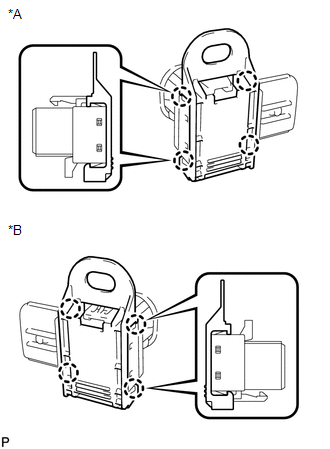
(c) Disengage the 4 claws to remove the ultrasonic sensor clip. Text in Illustration
|
|
3. REMOVE NO. 1 ULTRASONIC SENSOR
|
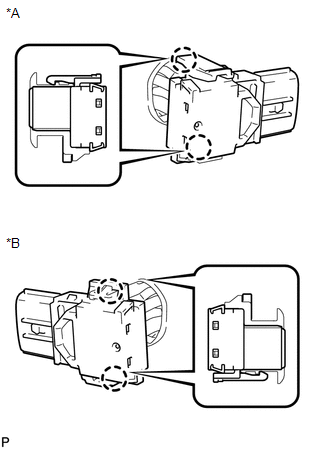
(a) Disengage the 2 claws to remove the No. 1 ultrasonic sensor. Text in Illustration
|
|
4. REMOVE NO. 1 ULTRASONIC SENSOR RETAINER
|
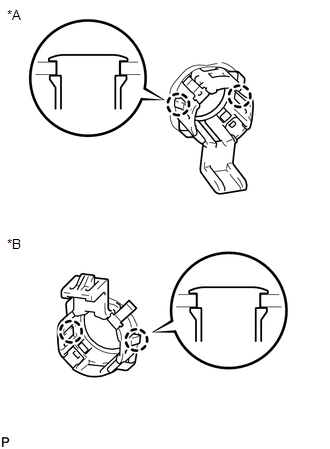
(a) Disengage the 2 claws to remove the No. 1 ultrasonic sensor retainer from the rear bumper assembly. Text in Illustration
|
|
 Inspection
INSPECTION
PROCEDURE
1. INSPECT NO. 1 ULTRASONIC SENSOR
(a) Measure the resistance according to the value(s) in the table below.
Standard Resistance:
Tester Conne ...
 Installation
INSTALLATION
PROCEDURE
1. INSTALL NO. 1 ULTRASONIC SENSOR RETAINER
(a) Engage the 2 claws to install the No. 1 ultrasonic sensor retainer
to the rear bumper assembly.
Text in Illu ...
Other materials about Toyota Venza:
Installation
INSTALLATION
PROCEDURE
1. INSTALL TRANSFER ASSEMBLY
(a) Install the transfer assembly to the automatic transaxle assembly
with 2 new bolts and the 6 nuts.
Torque:
69 N·m {700 kgf·cm, 51 ft·lbf}
NOTICE:
Install the ...
Removal
REMOVAL
PROCEDURE
1. DISCONNECT CABLE FROM NEGATIVE BATTERY TERMINAL
NOTICE:
When disconnecting the cable, some systems need to be initialized after the cable
is reconnected (See page ).
2. REMOVE FRONT WHEEL RH
3. REMOVE NO. 1 ENGINE UNDER COVER
4. ...
Front Passenger Side Door Entry Lock Function does not Operate
DESCRIPTION
If the front passenger door entry unlock function operates normally, but its
entry lock function does not, this means that the request code from the front passenger
door is being output normally. In this case, a malfunction in the lock sensor ...

0.1674