
Toyota Venza: Removal
REMOVAL
PROCEDURE
1. DISCONNECT CABLE FROM NEGATIVE BATTERY TERMINAL
CAUTION:
Wait at least 90 seconds after disconnecting the cable from the negative (-)
battery terminal to disable the SRS system (See page
.gif) ).
).
NOTICE:
When disconnecting the cable, some systems need to be initialized after the cable
is reconnected (See page ).
2. REMOVE REAR DOOR INSIDE HANDLE BEZEL PLUG
3. REMOVE REAR POWER WINDOW REGULATOR SWITCH ASSEMBLY WITH REAR DOOR ARMREST BASE PANEL
4. REMOVE REAR DOOR TRIM BOARD SUB-ASSEMBLY
5. REMOVE REAR DOOR INNER GLASS WEATHERSTRIP
6. REMOVE REAR SPEAKER ASSEMBLY
|
(a) Disconnect the connector. |
|
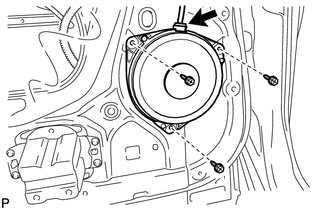
(b) Remove the 3 bolts and rear speaker assembly.
7. REMOVE REAR SPEAKER BRACKET (for 13 Speakers)
|
(a) Remove the 8 screws, rear speaker bracket and rear door speaker grille sub-assembly. |
|
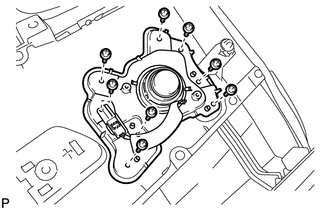
8. REMOVE REAR NO. 2 SPEAKER ASSEMBLY (for 13 Speakers)
|
(a) Remove the 2 screws. |
|
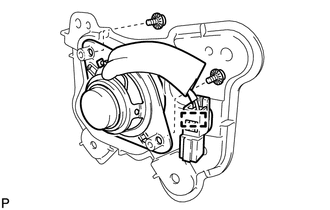
(b) Disengage the clamp and remove the rear No. 2 speaker assembly.
 Components
COMPONENTS
ILLUSTRATION
...
 Inspection
INSPECTION
PROCEDURE
1. INSPECT REAR SPEAKER ASSEMBLY
(a) With the speaker installed, check that there is no looseness or other abnormalities.
(b) Check that there is no foreign matter in the spea ...
Other materials about Toyota Venza:
Problem Symptoms Table
PROBLEM SYMPTOMS TABLE
HINT:
Use the table below to help determine the cause of problem symptoms.
If multiple suspected areas are listed, the potential causes of the symptoms
are listed in order of probability in the "Suspected Area" ...
Installation
INSTALLATION
PROCEDURE
1. INSTALL POWER STEERING ECU ASSEMBLY
(a) Engage the 4 wire harness clamps to the power steering ECU assembly.
(b) Install the power steering ECU assembly with the ...
Bottle holders
► For front seats
► For rear seats
NOTICE
- Items that should not be stowed in the bottle holders
Put the cap on before stowing a bottle. Do not place open bottles in the bottle
holders, or glasses and paper cups containing liquid. ...

0.1681