
Toyota Venza: Removal
REMOVAL
PROCEDURE
1. PRECAUTION
CAUTION:
- Be sure to read Precaution thoroughly before servicing (See page
.gif) ).
). - If the front seat side airbag assembly was deployed, replace the front seat side airbag assembly, front seat frame assembly with adjuster, separate type front seatback cover and separate type front seatback pad with the necessary parts in accordance with the extent of the collision damage.
2. DISCONNECT CABLE FROM NEGATIVE BATTERY TERMINAL
CAUTION:
Wait at least 90 seconds after disconnecting the cable from the negative (-) battery terminal to disable the SRS system
NOTICE:
When disconnecting the cable, some systems need to be initialized after the cable
is reconnected (See page ).
3. REMOVE FRONT SEAT HEADREST ASSEMBLY
4. REMOVE FRONT SEAT REAR OUTER TRACK COVER
(a) Lift up the seat track adjusting handle and move the front seat assembly to the foremost position.
|
(b) Disengage the 2 claws and remove the front seat rear outer track cover. |
|
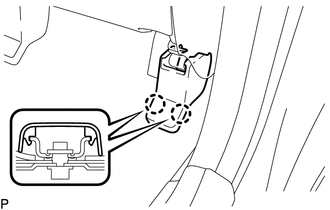
5. REMOVE FRONT SEAT REAR INNER TRACK COVER
|
(a) Disengage the 2 claws and remove the front seat rear inner track cover. |
|
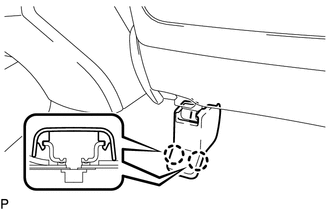
6. REMOVE FRONT SEAT ASSEMBLY
|
(a) Remove the 2 bolts on rear side of the front seat assembly. |
|
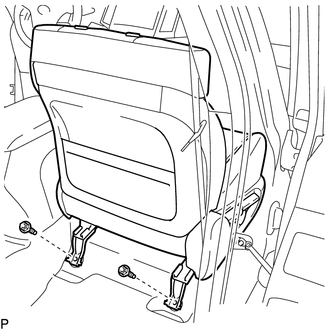
(b) Lift up the seat track adjusting handle and move the front seat assembly to the rearmost position.
|
(c) Remove the 2 bolts on front side of the front seat assembly. |
|
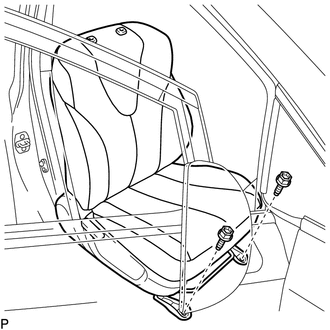
(d) Lift up the seat track adjusting handle and move the front seat assembly to the center position. Also, operate the reclining adjuster release handle and move the front seatback assembly to the upright position.
(e) Disconnect each connector under the front seat assembly.
(f) Remove the front seat assembly.
NOTICE:
Be careful not to damage the vehicle body.
 Components
COMPONENTS
ILLUSTRATION
ILLUSTRATION
ILLUSTRATION
ILLUSTRATION
...
 Reassembly
REASSEMBLY
PROCEDURE
1. INSTALL FRONT SEAT WIRE
(a) Engage the 2 clamps to install the front seat wire.
(b) Connect the 4 connectors.
2. ...
Other materials about Toyota Venza:
Removal
REMOVAL
PROCEDURE
1. DRAIN AUTOMATIC TRANSAXLE FLUID
2. REMOVE FRONT FRAME ASSEMBLY
See page
3. SUPPORT ENGINE ASSEMBLY
4. REMOVE BELT
5. REMOVE AUTOMATIC TRANSAXLE OIL PAN SUB-ASSEMBLY
(a) Remove the 18 bolts and automatic transa ...
Engine Coolant Temperature / Intake Air Temperature Correlation (P011B)
DESCRIPTION
The engine has two temperature sensors, an engine coolant temperature sensor
and an intake air temperature sensor, to detect the temperature while the engine
is in operation. A thermistor, whose resistance value varies according to the tempera ...
Data List / Active Test
DATA LIST / ACTIVE TEST
1. DATA LIST
HINT:
Using the Techstream to read the Data List allows the values or states of switches,
sensors, actuators and other items to be read without removing any parts. This non-intrusive
inspection can be very useful bec ...

0.1834