
Toyota Venza: Removal
REMOVAL
PROCEDURE
1. RECOVER REFRIGERANT FROM REFRIGERATION SYSTEM
.gif)
2. DISCONNECT CABLE FROM NEGATIVE BATTERY TERMINAL
NOTICE:
When disconnecting the cable, some systems need to be initialized after the cable
is reconnected (See page ).
3. REMOVE FRONT WHEEL RH
4. REMOVE NO. 1 ENGINE UNDER COVER
5. SEPARATE FRONT FENDER LINER RH
6. REMOVE FRONT FENDER APRON SEAL RH
7. REMOVE V-RIBBED BELT
8. REMOVE RADIATOR ASSEMBLY
HINT:
Refer to the procedure for Remove Radiator Assembly (See page
).
9. DISCONNECT COOLER REFRIGERANT DISCHARGE HOSE
|
(a) Disengage each clamp. |
|
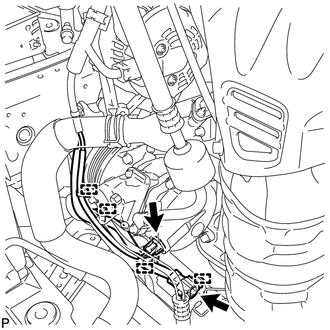
(b) Disconnect each connector.
|
(c) Using pliers, grip the claws of the clip and slide the clip to remove the No. 2 radiator hose. |
|
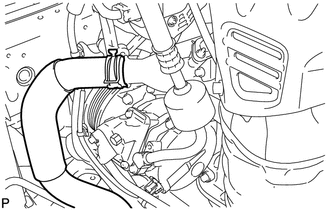
|
(d) Remove the bolt and disconnect the cooler refrigerant discharge hose from the compressor assembly with pulley. |
|
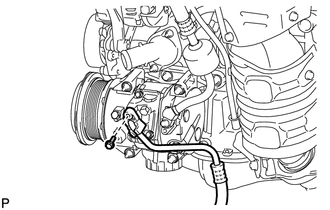
(e) Remove the O-ring from the discharge hose.
NOTICE:
Seal the openings of the disconnected parts using vinyl tape to prevent entry of moisture and foreign matter.
10. DISCONNECT SUCTION HOSE SUB-ASSEMBLY
|
(a) Remove the bolt and disconnect the suction hose sub-assembly from the compressor assembly with pulley. |
|
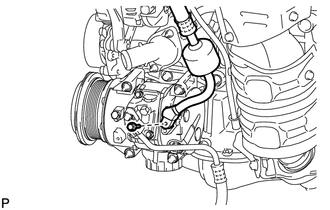
(b) Remove the O-ring from the suction hose sub-assembly.
NOTICE:
Seal the openings of the disconnected parts using vinyl tape to prevent entry of moisture and foreign matter.
11. REMOVE COMPRESSOR ASSEMBLY WITH PULLEY
|
(a) Remove the 2 bolts, 2 nuts and compressor assembly with pulley. |
|
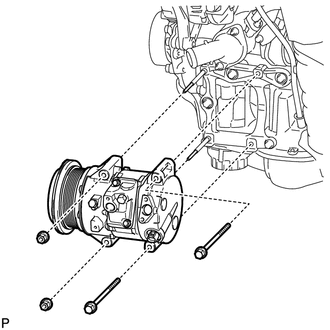
|
(b) Using an E8 "TORX" socket wrench, remove the 2 stud bolts. |
|
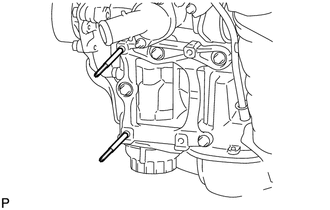
 Inspection
INSPECTION
PROCEDURE
1. INSPECT COMPRESSOR WITH PULLEY (SOLENOID VALVE)
(a) Measure the resistance according to the value(s) in the table below.
Standard Resistance:
...
 Installation
INSTALLATION
PROCEDURE
1. ADJUST COMPRESSOR OIL LEVEL
(a) When replacing the cooler compressor assembly with a new one, gradually
discharge the inert gas (helium) from the service va ...
Other materials about Toyota Venza:
Tire Pressure Warning Receiver
Components
COMPONENTS
ILLUSTRATION
Removal
REMOVAL
PROCEDURE
1. DISCONNECT CABLE FROM NEGATIVE BATTERY TERMINAL
NOTICE:
When disconnecting the cable, some systems need to be initialized after the cable
is reconnected (See page ).
2. REMOVE RO ...
Inspection
INSPECTION
PROCEDURE
1. INSPECT THROTTLE BODY ASSEMBLY
Text in Illustration
*1
Component without harness connected
(Throttle Body)
(a) Check that the throttle valve opens and closes smoothly.
(b) Check that there is no ...
Installation
INSTALLATION
PROCEDURE
1. INSTALL ATF TEMPERATURE SENSOR ASSEMBLY
(a) Coat a new O-ring with ATF and install it to the ATF temperature
sensor assembly.
Text in Illustration
*1
O-ring
...

0.1314