
Toyota Venza: Removal
REMOVAL
PROCEDURE
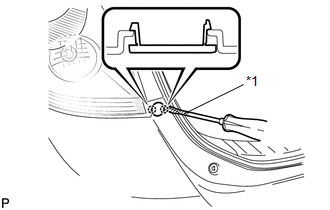
1. REMOVE REAR BUMPER PLATE LH
|
(a) Using a screwdriver with the tip wrapped with protective tape, disengage the 2 claws and remove the rear bumper plate LH. Text in Illustration
|
|
2. REMOVE REAR BUMPER PLATE RH
HINT:
Use the same procedure for the RH side and LH side.
3. REMOVE REAR BUMPER ASSEMBLY
|
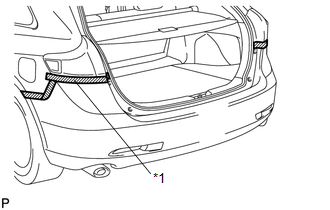
(a) Put protective tape around the rear bumper assembly. Text in Illustration
|
|
|
(b) Remove the 2 bolts and 2 screws. |
|
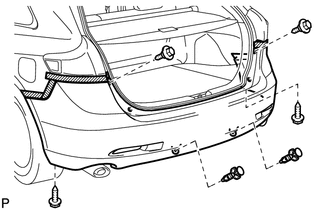
(c) Using a clip remover, remove the 2 clips.
|
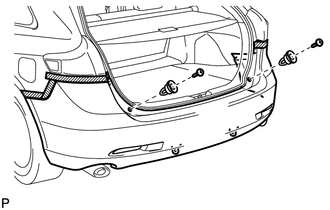
(d) Remove the 2 screws and 2 clips. |
|
|
(e) Remove the screw. HINT: Use the same procedure for the RH side and LH side. |
|
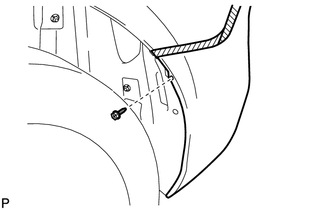
|
(f) Disengage the 5 claws. HINT: Use the same procedure for the RH side and LH side. |
|
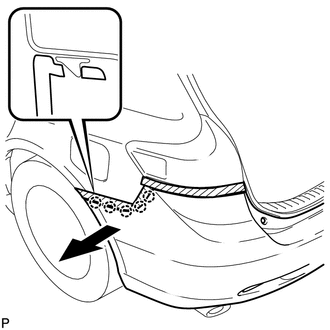
|
(g) Disengage the 6 claws as shown in the illustration. |
|
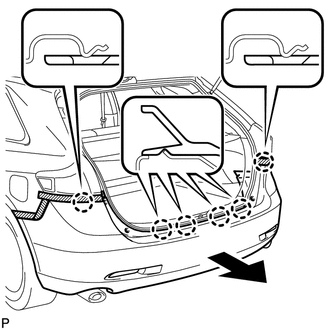
(h) w/ Intuitive Parking Assist System:
(1) Disconnect each connector.
(i) Remove the rear bumper assembly.
 Components
COMPONENTS
ILLUSTRATION
ILLUSTRATION
ILLUSTRATION
ILLUSTRATION
...
 Disassembly
DISASSEMBLY
PROCEDURE
1. REMOVE ULTRASONIC SENSOR CLIP (w/ Intuitive Parking Assist System)
2. REMOVE NO. 1 ULTRASONIC SENSOR (w/ Intuitive Parking Assist System)
3. REMOVE NO. 1 ULTRASONIC ...
Other materials about Toyota Venza:
Terminals Of Ecu
TERMINALS OF ECU
1. CHECK POSITION CONTROL ECU AND SWITCH ASSEMBLY
(a) Disconnect the T10 and T11 position control ECU and switch assembly connectors.
(b) Measure the voltage and resistance according to the value(s) in the table
below.
HINT:
Measure t ...
Data List / Active Test
DATA LIST / ACTIVE TEST
1. DATA LIST
NOTICE:
In the table below, the values listed under "Normal Condition" are reference
values. Do not depend solely on these reference values when deciding whether a part
is faulty or not.
HINT:
Using the T ...
Terminals Of Ecu
TERMINALS OF ECU
1. CENTER AIRBAG SENSOR ASSEMBLY
Terminal No.
Terminal Symbol
Destination
L31-1
SFL+
Front seat side airbag assembly LH (Side squib LH)
L31-2
...

0.1556