
Toyota Venza: Parts Location
PARTS LOCATION
ILLUSTRATION
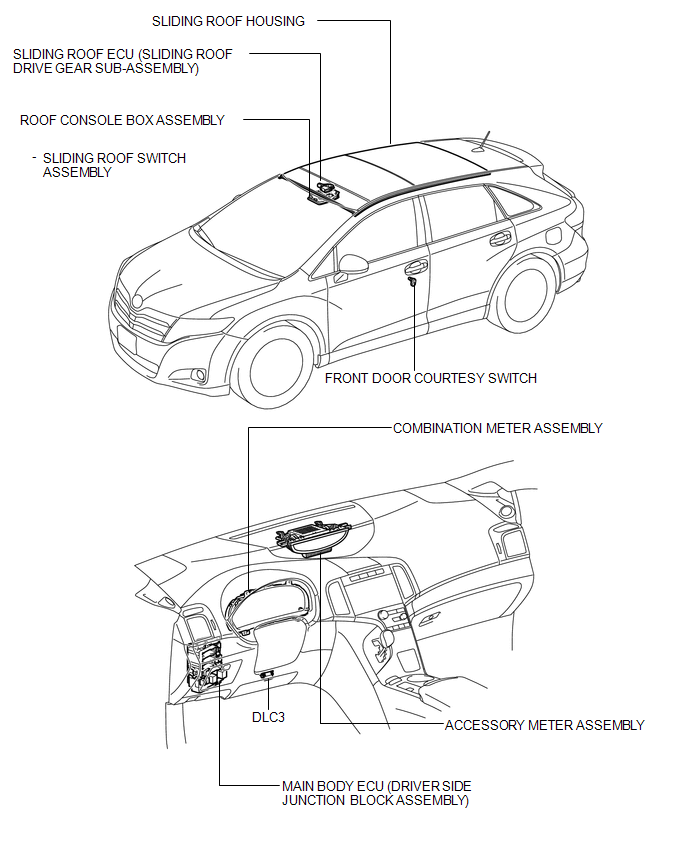
 Precaution
PRECAUTION
NOTICE:
When disconnecting the cable from the negative (-) battery terminal, initialize
the following systems after the cable is reconnected.
System Name
See Proc ...
 System Diagram
SYSTEM DIAGRAM
Communication Table
Sender
Receiver
Signal
Line
Main body ECU (Driver side junction block assembly)
Sliding ro ...
Other materials about Toyota Venza:
Diagnosis System
DIAGNOSIS SYSTEM
1. DESCRIPTION
(a) When troubleshooting a vehicle with a diagnosis system, the only difference
from the usual troubleshooting procedure is connecting the Techstream to the vehicle
and reading various data output from the clearance warnin ...
Intake Air Temperature Circuit Low Input (P0112,P0113)
DESCRIPTION
The intake air temperature sensor, in the mass air flow meter, monitors
the intake air temperature. The intake air temperature sensor has a built-in
thermistor with a resistance that varies according to the temperature of
the ...
Cleaning and protecting the vehicle interior
The following procedures will help protect your vehicle’s interior and keep
it in top condition: - Protecting the vehicle interior
Remove dirt and dust using a vacuum cleaner. Wipe dirty surfaces with a cloth dampened
with lukewarm water.
- Cleaning t ...

0.1674