
Toyota Venza: Jam Protection Function Activates During Power Back Door Operation
DESCRIPTION
When the jam protection function activates during power back door operation, one of the following may be the cause: 1) improper fit of back door, or a foreign object is stuck in the back door, 2) malfunctioning power back door touch sensor circuit or 3) malfunctioning power back door ECU (power back door motor unit).
WIRING DIAGRAM
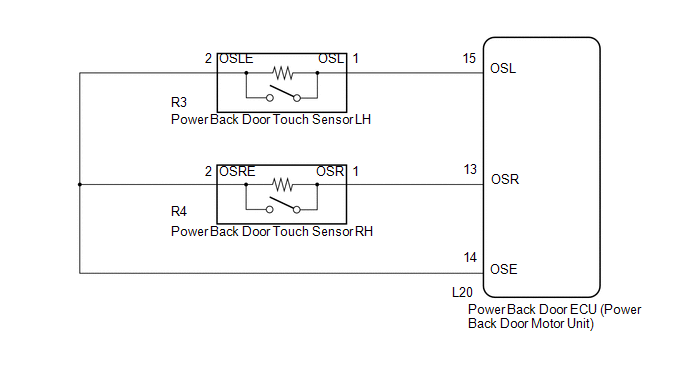
PROCEDURE
|
1. |
CHECK BACK DOOR LOCK FUNCTION |
(a) Check if there are any foreign objects interfering with back door operation.
OK:
There are no foreign objects.
| NG | .gif) |
REMOVE FOREIGN OBJECT |
|
.gif)
|
2. |
CHECK BACK DOOR |
(a) Check back door operation.
(1) Turn the power back door main switch off.
(2) Open/close the back door by hand.
OK:
The back door fully opens and closes smoothly.
| NG | |
ADJUST BACK DOOR |
|
|
3. |
READ VALUE USING TECHSTREAM (POWER BACK DOOR TOUCH SENSOR) |
(a) Connect the Techstream to the DLC3.
(b) Turn the ignition switch to ON.
(c) Turn the Techstream on.
(d) Enter the following menus: Body Electrical / Back Door / Data List.
(e) Check the Data List to determine if the power back door touch sensor functions properly.
Back Door (Power Back Door ECU)|
Tester Display |
Measurement Item/Range |
Normal Condition |
Diagnostic Note |
|---|---|---|---|
|
PBD Touch Sensor (Right) |
Power back door touch sensor RH signal / ON , OFF or Open |
ON: Power back door touch sensor RH pressed OFF: Power back door touch sensor RH not pressed Open: Power back door touch sensor RH circuit open |
- |
|
PBD Touch Sensor (Left) |
Power back door touch sensor LH signal / ON , OFF or Open |
ON: Power back door touch sensor LH pressed OFF: Power back door touch sensor LH not pressed Open: Power back door touch sensor LH circuit open |
- |
|
Result |
Proceed to |
|---|---|
|
On the Techstream screen, ON or OFF will be displayed accordingly. |
A |
|
On the Techstream screen, ON or OFF will not be displayed accordingly or Open is displayed. |
B |
| A | |
REPLACE POWER BACK DOOR ECU (POWER BACK DOOR MOTOR UNIT) |
| B | |
GO TO OTHER FLOW CHART (TOUCH SENSOR CIRCUIT) |
 Power Back Door cannot be Closed Using the Power Back Door Closer Switch
DESCRIPTION
When the power back door cannot be closed using the power back door closer switch,
either of the following may be malfunctioning: 1) power back door closer switch
circuit or 2) power ...
 Power Back Door Warning System does not Operate
DESCRIPTION
When the power back door warning system does not operate, one of the following
may be malfunctioning: 1) power back door warning buzzer circuit, 2) wireless door
lock control system o ...
Other materials about Toyota Venza:
On-vehicle Inspection
ON-VEHICLE INSPECTION
PROCEDURE
1. INSPECT SPEEDOMETER
(a) Check the operation.
(1) Using a speedometer tester (calibrated chassis dynamometer), check the speedometer
indication according to the table below.
Reference:
Chassis Dynamometer In ...
Installation
INSTALLATION
PROCEDURE
1. TEMPORARILY INSTALL REAR STABILIZER BAR BRACKET LH (for Front Side)
(a) Temporarily install the rear stabilizer bar bracket LH (front side)
with the bolt.
HINT:
Loosely tighten the bolt so that the bracket can ...
Data List / Active Test
DATA LIST / ACTIVE TEST
1. DATA LIST
HINT:
Using the Techstream to read the Data List allows the values or states of switches,
sensors, actuators and other items to be read without removing any parts. This non-intrusive
inspection can be very useful bec ...

0.1204