
Toyota Venza: Installation
INSTALLATION
PROCEDURE
1. INSTALL SEPARATE TYPE FRONT SEAT CUSHION COVER
|
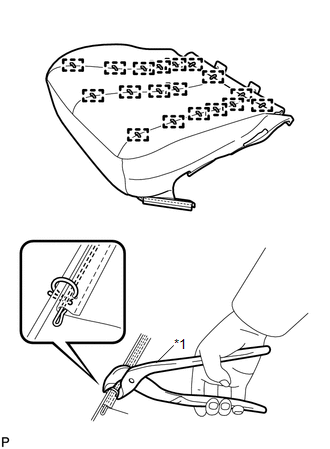
(a) Using a tacker, install the separate type front seat cushion heater to the end of the separate type front seat cushion cover with 25 new tack pins. NOTICE: Be careful not to damage the cushion. |
|
.png)
|
(b) Using hog ring pliers, temporarily install the separate type front seat cover with 18 new hog rings. Text in Illustration
NOTICE:
|
|
2. INSTALL SEPARATE TYPE FRONT SEAT CUSHION COVER WITH PAD
.gif)
3. INSTALL POWER SEAT SWITCH
4. INSTALL FRONT INNER SEAT CUSHION SHIELD
5. INSTALL FRONT SEAT INNER BELT ASSEMBLY
6. INSTALL FRONT SEAT CUSHION SHIELD ASSEMBLY
7. INSTALL SLIDE AND VERTICAL POWER SEAT SWITCH KNOB
8. INSTALL RECLINING POWER SEAT SWITCH KNOB
9. INSTALL FRONT SEAT ASSEMBLY
10. INSTALL FRONT SEAT REAR INNER TRACK COVER
11. INSTALL FRONT SEAT REAR OUTER TRACK COVER
12. INSTALL FRONT SEAT HEADREST ASSEMBLY
13. INSPECT FRONT SEAT ASSEMBLY
14. INSPECT SRS WARNING LIGHT
(See page )
 Inspection
INSPECTION
PROCEDURE
1. INSPECT FRONT SEAT CUSHION HEATER LH
(a) Check the seat cushion heater.
(1) Apply battery voltage and check the seat cushion heater.
OK:
...

Other materials about Toyota Venza:
Security Indicator Light Circuit
DESCRIPTION
Even when the theft deterrent system is in the disarmed state, the security indicator
blinks due to a signal output from the immobiliser system. The security indicator
blinks continuously due to a continuous signal received from the immobilise ...
Dtc Check / Clear
DTC CHECK / CLEAR
1. CHECK DTC
(a) Connect the Techstream to the DLC3.
(b) Turn the engine switch on (IG).
(c) Read the DTC by following the prompts on the Techstream screen.
HINT:
Refer to the Techstream operator's manual for further details.
2. CL ...
Diagnostic Trouble Code Chart
DIAGNOSTIC TROUBLE CODE CHART
HINT:
If a trouble code is output during the DTC check, inspect the trouble areas listed
for that code. For details of the code, refer to "See page" in the DTC chart.
Inspect the fuses and relays before troub ...

0.1302