
Toyota Venza: Inspection
INSPECTION
PROCEDURE
1. INSPECT ENGINE SWITCH
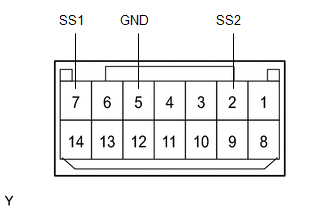
(a) Measure the resistance according to the value(s) in the table below.
Standard Resistance:
|
Tester Connection |
Switch Condition |
Specified Condition |
|---|---|---|
|
7 (SS1) - 5 (GND) |
Not pushed |
10 kΩ or higher |
|
2 (SS2) - 5 (GND) |
Not pushed |
10 kΩ or higher |
|
7 (SS1) - 5 (GND) |
Pushed |
15 Ω |
|
2 (SS2) - 5 (GND) |
Pushed |
15 Ω |
If the result is not as specified, replace the engine switch.
(b) Apply battery voltage between the terminals of the switch, and check the illumination condition of the engine switch.
HINT:
- If a positive (+) battery lead and a negative (-) battery lead are incorrectly connected, the engine switch indicator light will not illuminate.
- If the voltage is too low, the indicator light will not illuminate.
OK:
|
Measurement Condition |
Specified Condition |
|---|---|
|
Battery positive (+) → Terminal 11 (SWIL) Battery negative (-) → Terminal 4 (COM) or 5 (GND) |
Illuminates |
|
Battery positive (+) → Terminal 12 (INDS) Battery negative (-) → Terminal 4 (COM) or 5 (GND) |
Illuminates |
|
Battery positive (+) → Terminal 13 (INDW) Battery negative (-) → Terminal 4 (COM) or 5 (GND) |
Illuminates |
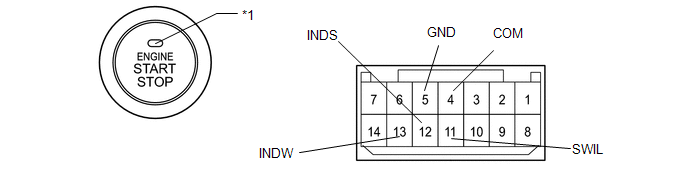 Text in Illustration
|
*1 |
Indicator Light |
If the result is not as specified, replace the engine switch.
 Components
COMPONENTS
ILLUSTRATION
ILLUSTRATION
...
 Removal
REMOVAL
PROCEDURE
1. DISCONNECT CABLE FROM NEGATIVE BATTERY TERMINAL
NOTICE:
When disconnecting the cable, some systems need to be initialized after the cable
is reconnected (See page ).
2. RE ...
Other materials about Toyota Venza:
System Description
SYSTEM DESCRIPTION
1. OUTLINE OF THEFT DETERRENT SYSTEM
The theft deterrent system can be set by locking the doors using the
transmitter or key, or by opening and closing the doors (for details, refer
to Active Arming Mode or Passive Arming Mo ...
Side Turn Signal Light Assembly
Components
COMPONENTS
ILLUSTRATION
Removal
REMOVAL
CAUTION / NOTICE / HINT
HINT:
Use the same procedure for the RH and LH sides.
The procedure described below is for the LH side.
PROCEDURE
1. REMOVE OUTER MIRROR
2. REMOVE O ...
Problem Symptoms Table
PROBLEM SYMPTOMS TABLE
Use the table below to help determine the cause of problem symptoms. If multiple
suspected areas are listed, the potential causes of the symptoms are listed in order
of probability in the "Suspected Area" column of the tab ...

0.1475