
Toyota Venza: Removal
REMOVAL
PROCEDURE
1. DISCONNECT CABLE FROM NEGATIVE BATTERY TERMINAL
NOTICE:
When disconnecting the cable, some systems need to be initialized after the cable
is reconnected (See page .gif) ).
).
2. REMOVE RADIATOR RESERVE TANK ASSEMBLY
|
(a) Remove the radiator reserve tank assembly. |
|
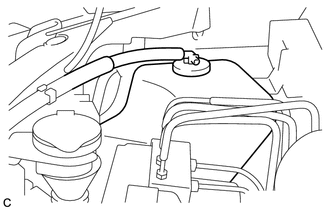
(b) Remove the radiator reserve tank cap assembly.
3. REMOVE BRAKE ACTUATOR WITH BRACKET
|
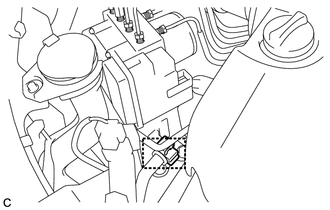
(a) Remove the clamp and separate the suction hose sub-assembly from the brake actuator bracket assembly. |
|
|
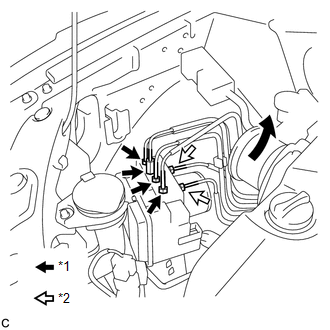
(b) Using union nut wrenches (10 mm and 12 mm), disconnect the 6 brake lines from the brake actuator with bracket. Text in Illustration
|
|
|
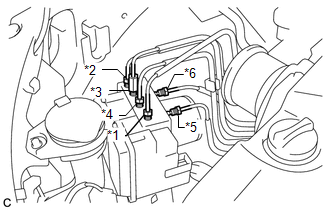
(c) Use tags or make a memo to identify the places to reconnect. Text in Illustration
|
|
|
(d) Release the lock lever and disconnect the brake actuator connector. NOTICE: Be careful not to allow brake fluid to enter the removed connector. |
|
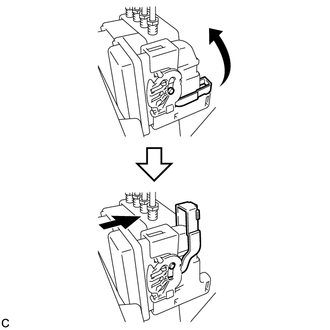
|
(e) Remove the nut, 2 bolts and brake actuator with bracket from the body. NOTICE: Do not damage the brake lines or wire harness. |
|
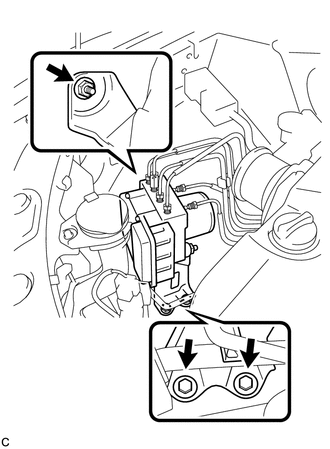
4. REMOVE BRAKE ACTUATOR ASSEMBLY
|
(a) Loosen the 2 nuts and remove the brake actuator assembly from the brake actuator bracket assembly. |
|
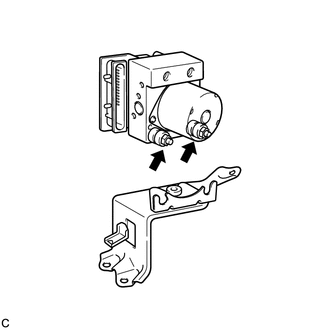
 On-vehicle Inspection
ON-VEHICLE INSPECTION
PROCEDURE
1. CONNECT TECHSTREAM
(a) Connect the Techstream to the DLC3.
(b) Start the engine and run it at idle.
(c) Enter the following menus: Chassis / ABS/VSC/TRAC / Acti ...
 Installation
INSTALLATION
PROCEDURE
1. INSTALL BRAKE ACTUATOR ASSEMBLY
(a) Install the brake actuator assembly to the brake actuator bracket
assembly with the 2 nuts.
Torque:
8.0 N·m {82 ...
Other materials about Toyota Venza:
System Diagram
SYSTEM DIAGRAM
Communication Table
Sender
Receiver
Signal
Line
Main Body ECU
(Driver Side Junction Block Assembly)
Clearance Warning ECU Assembly
Destination information
...
License Plate Light Assembly
Components
COMPONENTS
ILLUSTRATION
ILLUSTRATION
Installation
INSTALLATION
PROCEDURE
1. INSTALL LICENSE PLATE LIGHT ASSEMBLY
(a) Engage the 2 claws to install the license plate light assembly.
...
Diagnosis System
DIAGNOSIS SYSTEM
1. DESCRIPTION
(a) Diagnostic Trouble Codes (DTCs) can be read from the Data Link Connector
3 (DLC3) of the vehicle. When the rear view monitor system seems to be malfunctioning,
use the Techstream to check for malfunctions and to perfor ...

0.1732