
Toyota Venza: Disassembly
DISASSEMBLY
PROCEDURE
1. REMOVE PROPELLER SHAFT
|
(a) Place matchmarks on both flanges. Text in Illustration
|
|
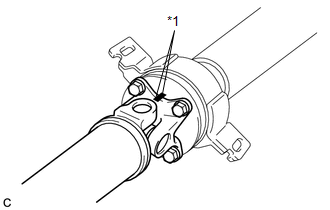
(b) Remove the 4 nuts, 4 bolts and 4 washers.
2. REMOVE INTERMEDIATE SHAFT
|
(a) Place matchmarks on the intermediate shaft and rear propeller shaft. NOTICE: Do not place matchmarks with a punch. Text in Illustration
|
|
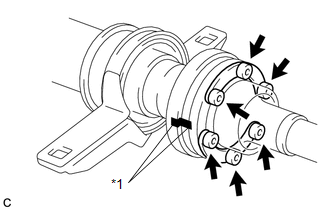
(b) Using a hexagon wrench (6 mm), remove the 6 bolts, 2 washers and intermediate shaft from the rear propeller shaft.
3. REMOVE NO. 1 CENTER SUPPORT BEARING ASSEMBLY
|
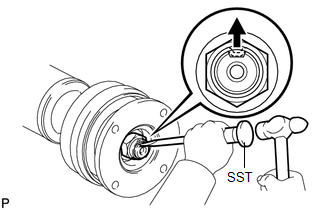
(a) Using SST and a hammer, loosen the staked part of the nut. SST: 09930-00010 |
|
|
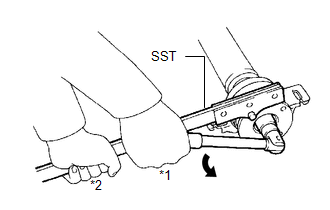
(b) Using SST to hold the universal joint flange, remove the nut and washer SST: 09330-00021 Text in Illustration
|
|
|
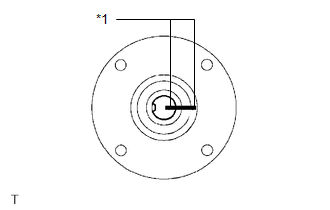
(c) Place matchmarks on the universal joint flange and intermediate shaft. Text in Illustration
|
|
|
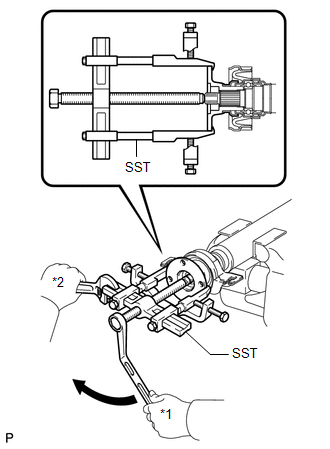
(d) Hold the intermediate shaft in a vise using aluminum plates and remove the universal joint flange using SST. SST: 09950-40011 09951-04020 09952-04010 09953-04030 09954-04010 09955-04061 09957-04010 09958-04011 NOTICE:
|
|
(e) Remove the No. 1 center support bearing assembly and washer.
4. REMOVE NO. 2 CENTER SUPPORT BEARING ASSEMBLY
|
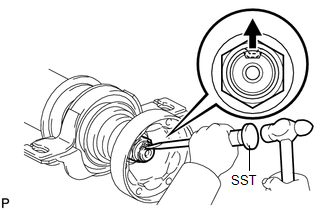
(a) Using SST and a hammer, loosen the staked part of the nut. SST: 09930-00010 |
|
|
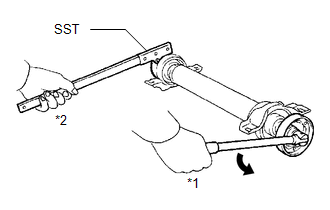
(b) Using SST to hold the universal joint flange, remove the nut and washer. SST: 09330-00021 Text in Illustration
|
|
|
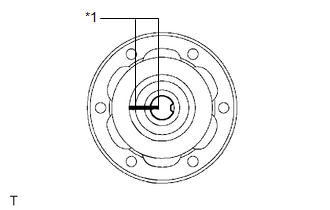
(c) Place matchmarks on the universal joint flange and intermediate shaft. Text in Illustration
|
|
|
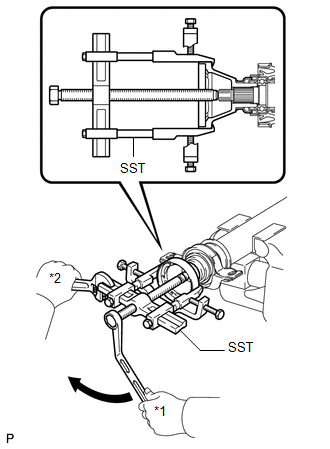
(d) Hold the intermediate shaft in a vise using aluminum plates and remove the universal joint flange using SST. SST: 09950-40011 09951-04020 09952-04010 09953-04030 09954-04010 09955-04061 09957-04010 09958-04011 NOTICE:
|
|
(e) Remove the No. 2 center support bearing assembly and washer.
 Removal
REMOVAL
PROCEDURE
1. REMOVE TAIL EXHAUST PIPE ASSEMBLY (for 1AR-FE)
2. REMOVE TAIL EXHAUST PIPE ASSEMBLY (for 2GR-FE)
3. REMOVE CENTER EXHAUST PIPE ASSEMBLY (for 1AR-FE)
4. REMOVE CENTER ...
 Inspection
INSPECTION
PROCEDURE
1. INSPECT UNIVERSAL JOINT SPIDER ASSEMBLY
(a) Check the spider bearing axial play by turning the flange while holding
the shaft tightly.
HINT:
If necessar ...
Other materials about Toyota Venza:
Diagnostic Trouble Code Chart
DIAGNOSTIC TROUBLE CODE CHART
HINT:
If a DTC is displayed during the DTC check, check the parts listed in
the table below and proceed to the "See page" given.
If multiple suspected areas are listed, the potential causes of the
s ...
Reassembly
REASSEMBLY
PROCEDURE
1. INSTALL GENERATOR ROTOR ASSEMBLY
(a) Place the generator drive end frame on the generator pulley.
(b) Install the generator rotor to the generator drive end frame.
...
Does not Play even after Bluetooth Audio Mode is Selected
CAUTION / NOTICE / HINT
HINT:
Even if the portable player can play audio content, it may not be able to play
via the in-vehicle device. This does not necessarily indicate a malfunction of the
in-vehicle device.
PROCEDURE
1.
CHECK ...

0.126