
Toyota Venza: Console boxes
► Front
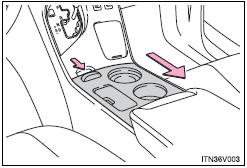
Press the tab and slide to open.
► Rear
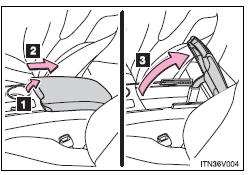
1. Pull up the lever to release the lock.
2. Slide the armrest fully rearward.
3. Lift the armrest to open.
- When using the rear console box lid as an armrest
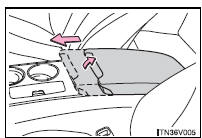
If necessary, the console box lid can slide forward. Pull the lid forward while pulling up the lever.
- Tray in the rear console box
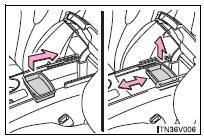
The tray slides forward/backward and can be removed.
CAUTION
- While driving
Keep the console box closed.
Injuries may result in the event of sudden braking, sudden swerving or an accident.
 Glove box
Pull up the lever.
- Glove box light
The glove box light turns on when the tail lights are on.
CAUTION
- While driving
Keep the glove box closed. In the event of sudden braking or s ...
 Overhead console
Push the lid.
The overhead console is useful for temporarily storing small items.
CAUTION
- While driving
Do not leave the overhead console open. Items may fall out and cause injury. ...
Other materials about Toyota Venza:
Customize Parameters
CUSTOMIZE PARAMETERS
HINT:
The following items can be customized.
NOTICE:
After confirming whether the items requested by the customer are applicable
or not for customization, perform customizing operations.
Be sure to record the current se ...
Ambient Temperature Sensor
Components
COMPONENTS
ILLUSTRATION
Inspection
INSPECTION
PROCEDURE
1. INSPECT AMBIENT TEMPERATURE SENSOR
(a) Measure the resistance according to the value(s) in the table below.
Standard Resistance:
Tester Connection
C ...
Components
COMPONENTS
ILLUSTRATION
ILLUSTRATION
ILLUSTRATION
ILLUSTRATION
ILLUSTRATION
...

0.1333