
Toyota Venza: Smart key system
The following operations can be performed simply by carrying the electronic key on your person, for example in your pocket.
(The driver should always carry the electronic key.)
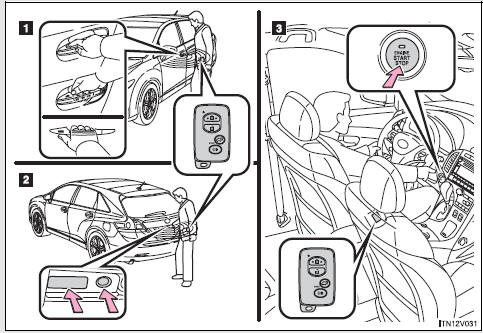
1. Locks and unlocks the doors 2. Locks and unlocks the doors 3. Starts and stops the engine

 Unlocking and locking the doors
►Front door handle
Grip the driver’s door handle to unlock the door. Grip the passenger’s door handle
to unlock all the doors.* Make sure to touch the sensor on the back of the handle.
...
Other materials about Toyota Venza:
Engine
General Maintenance
GENERAL MAINTENANCE
CAUTION / NOTICE / HINT
HINT:
Perform these procedures after the engine has cooled down.
PROCEDURE
1. INSPECT DRIVE BELT
Engine Type
See Procedure
2GR-FE
See pag ...
How To Proceed With Troubleshooting
CAUTION / NOTICE / HINT
HINT:
Use the following procedure to troubleshoot.
PROCEDURE
1.
VEHICLE BROUGHT TO WORKSHOP
NEXT
2.
CUSTOMER PR ...
ABS Warning Light Remains ON
DESCRIPTION
The skid control ECU is connected to the combination meter via CAN communication.
If any of the following is detected, the ABS warning light remains on:
The skid control ECU connector is disconnected from the skid control
ECU.
The ...

0.1458