
Toyota Venza: Seat Memory Switch
Components
COMPONENTS
ILLUSTRATION
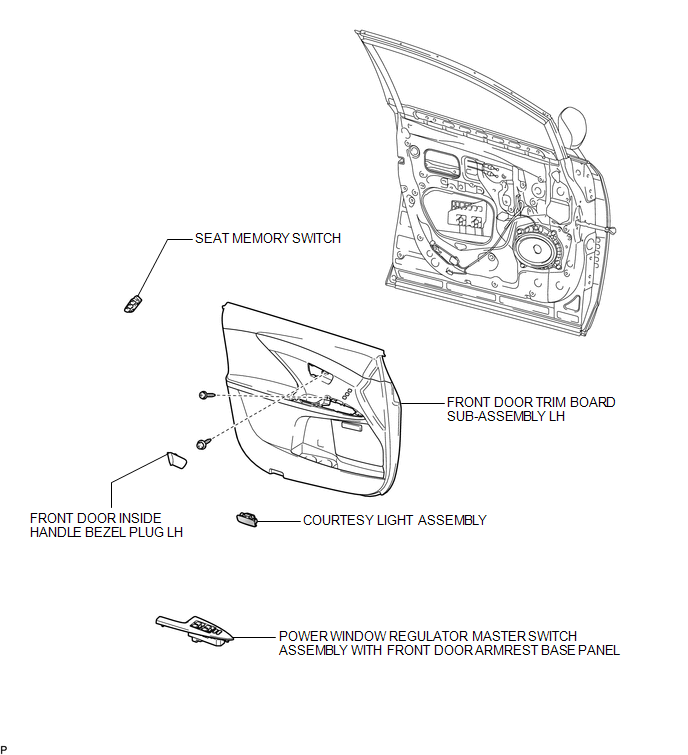
Removal
REMOVAL
PROCEDURE
1. REMOVE FRONT DOOR INSIDE HANDLE BEZEL PLUG LH
.gif)
2. REMOVE POWER WINDOW REGULATOR MASTER SWITCH ASSEMBLY WITH FRONT DOOR ARMREST BASE PANEL
3. REMOVE COURTESY LIGHT ASSEMBLY
4. REMOVE FRONT DOOR TRIM BOARD SUB-ASSEMBLY LH
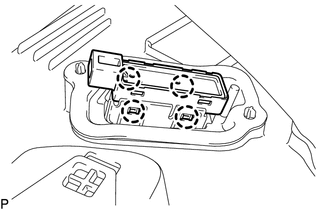
5. REMOVE SEAT MEMORY SWITCH
|
(a) Disengage the 4 claws and remove the seat memory switch from the front door trim board sub-assembly LH. |
|
Inspection
INSPECTION
PROCEDURE
1. INSPECT SEAT MEMORY SWITCH
|
(a) Measure the resistance according to the value(s) in the table below. Standard Resistance:
If the result is not as specified, replace the seat memory switch. |
|
.png)
Installation
INSTALLATION
PROCEDURE
1. INSTALL SEAT MEMORY SWITCH
(a) Engage the 4 claws to install the seat memory switch to the front door trim board sub-assembly LH.
2. INSTALL FRONT DOOR TRIM BOARD SUB-ASSEMBLY LH
.gif)
3. INSTALL COURTESY LIGHT ASSEMBLY
4. INSTALL POWER WINDOW REGULATOR MASTER SWITCH ASSEMBLY WITH FRONT DOOR ARMREST BASE PANEL
5. INSTALL FRONT DOOR INSIDE HANDLE BEZEL PLUG LH
 Seat Heater System
Precaution
PRECAUTION
1. NOTICE FOR INITIALIZATION
HINT:
When disconnecting the cable from the negative (-) battery terminal, initialize
the following systems after the cable is reconnected.
...
 Seat Belt
...
Other materials about Toyota Venza:
Freeze Frame Data
FREEZE FRAME DATA
1. FREEZE FRAME DATA
NOTICE:
Freeze frame data values will vary depending on the measurement conditions,
surroundings, or vehicle conditions. For this reason, there may be a problem
even when the values are within specifica ...
System Description
SYSTEM DESCRIPTION
1. GENERAL
The windshield deicer system's thin heater wires are attached to the inside of
the front window and deice the window surface quickly. The indicator light illuminates
while the system is operating. The system automaticall ...
Lost Communication with Rear Airbag Sensor RH (B1632/81,B1633/81,B1642/81,B1692/81,B1693/81)
DESCRIPTION
The side collision sensor RH circuit (to determine deployment of the front seat
side airbag assembly RH and curtain shield airbag assembly RH) is composed of the
center airbag sensor assembly, rear airbag sensor RH and side airbag sensor RH.
...

0.1223