
Toyota Venza: Removal
REMOVAL
PROCEDURE
1. DISCONNECT CABLE FROM NEGATIVE BATTERY TERMINAL
CAUTION:
Wait at least 90 seconds after disconnecting the cable from the negative (-) battery terminal to disable the SRS system.
NOTICE:
When disconnecting the cable, some systems need to be initialized after the cable
is reconnected (See page .gif) ).
).
2. REMOVE FRONT SEAT ASSEMBLY LH
HINT:
Refer to the instructions for Removal of the front seat assembly.
- for Manual Seat: See page
- for Power Seat: See page
3. REMOVE UPPER CONSOLE PANEL SUB-ASSEMBLY (w/o Seat Heater System)
4. REMOVE UPPER CONSOLE PANEL SUB-ASSEMBLY (w/ Seat Heater System)
5. REMOVE NO. 2 CONSOLE BOX CARPET
6. REMOVE CONSOLE BOX ASSEMBLY
7. REMOVE AIR CONDITIONING CONTROL ASSEMBLY
8. REMOVE FRONT DOOR SCUFF PLATE LH
9. REMOVE COWL SIDE TRIM SUB-ASSEMBLY LH
10. REMOVE LOWER NO. 1 INSTRUMENT PANEL FINISH PANEL
11. REMOVE FRONT DOOR SCUFF PLATE RH
12. REMOVE COWL SIDE TRIM SUB-ASSEMBLY RH
13. REMOVE NO. 2 INSTRUMENT PANEL UNDER COVER SUB-ASSEMBLY
14. REMOVE LOWER INSTRUMENT PANEL SUB-ASSEMBLY
15. REMOVE SHIFT LEVER KNOB SUB-ASSEMBLY
16. REMOVE POSITION INDICATOR HOUSING ASSEMBLY
17. REMOVE CONSOLE BOX SUB-ASSEMBLY
18. SEPARATE PARKING BRAKE PEDAL ASSEMBLY
(a) Turn back the floor carpet.
|
(b) Disconnect the heated oxygen sensor connector and disengage the 2 clamps (for 2GR-FE). |
|
.png)
(c) Remove the bolt and nut, and separate the No. 1 parking brake cable assembly from the body.
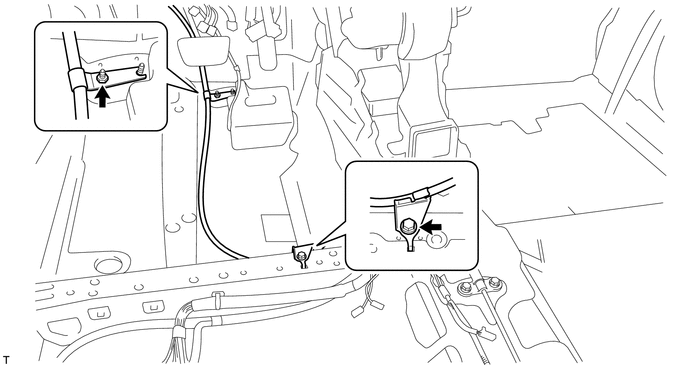
|
(d) Disconnect the parking brake switch connector. |
|
.png)
|
(e) Remove the 3 nuts and separate the parking brake pedal assembly from the body. |
|
.png)
19. REMOVE PARKING BRAKE SWITCH ASSEMBLY
|
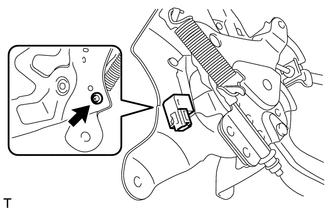
(a) Remove the screw and parking brake switch assembly. |
|
 Components
COMPONENTS
ILLUSTRATION
ILLUSTRATION
ILLUSTRATION
ILLUSTRATION
...
 Inspection
INSPECTION
PROCEDURE
1. INSPECT PARKING BRAKE SWITCH ASSEMBLY
(a) Measure the resistance according to the value(s) in the table below.
Standard Resistance:
Tester ...
Other materials about Toyota Venza:
Installation
INSTALLATION
PROCEDURE
1. INSTALL TRANSMISSION CONTROL CABLE ASSEMBLY
NOTICE:
Before installing the transmission control cable assembly, check that the park/neutral
position switch and the shift lever are in neutral.
(a) Pass the control cable from the ...
Idle Control System Malfunction (P0505)
DESCRIPTION
The idle speed is controlled by the electronic throttle control system. The electronic
throttle control system is comprised of: 1) the one-valve-type throttle body; 2)
the throttle actuator, which operates the throttle valve; 3) the throttle p ...
Replacing a flat tire
Chock the tires.
Slightly loosen the wheel nuts (one turn).
Turn the tire jack portion “A” by hand until the notch of the jack is in contact
with the jack point.
Raise the vehicle until the tire is slightly raised off the ground.
Remove a ...

0.1405