
Toyota Venza: Removal
REMOVAL
PROCEDURE
1. REMOVE UPPER CONSOLE PANEL SUB-ASSEMBLY (w/o Seat Heater System)
.gif)
2. REMOVE UPPER CONSOLE PANEL SUB-ASSEMBLY (w/ Seat Heater System)
3. REMOVE NO. 2 CONSOLE BOX CARPET
4. REMOVE CONSOLE BOX ASSEMBLY
5. REMOVE AIR CONDITIONING CONTROL ASSEMBLY
6. REMOVE FRONT DOOR SCUFF PLATE RH
7. REMOVE COWL SIDE TRIM SUB-ASSEMBLY RH
8. REMOVE NO. 2 INSTRUMENT PANEL UNDER COVER SUB-ASSEMBLY
9. REMOVE LOWER INSTRUMENT PANEL SUB-ASSEMBLY
10. REMOVE SHIFT LEVER KNOB SUB-ASSEMBLY
11. REMOVE POSITION INDICATOR HOUSING ASSEMBLY
12. REMOVE CONSOLE BOX SUB-ASSEMBLY
13. REMOVE NO. 2 INSTRUMENT PANEL SPEAKER PANEL SUB-ASSEMBLY
14. REMOVE RADIO AND DISPLAY RECEIVER ASSEMBLY WITH BRACKET
|
(a) Remove the 4 bolts. |
|
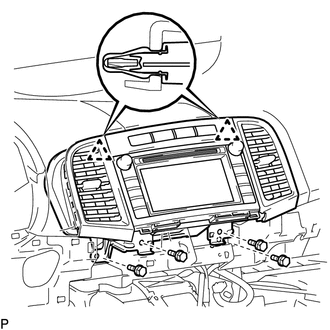
(b) Disengage the 2 clips.
(c) Disconnect each connector and remove the radio and display receiver assembly with bracket.
15. REMOVE INSTRUMENT CLUSTER CENTER FINISH PANEL SUB-ASSEMBLY
|
(a) Remove the 4 screws. |
|
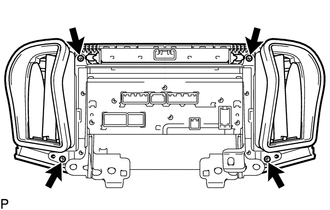
|
(b) Disengage the 4 claws and remove the instrument cluster center finish panel sub-assembly. |
|
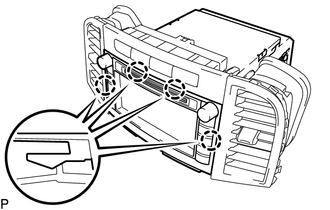
16. REMOVE STEREO COMPONENT TUNER ASSEMBLY WITH WIRE (w/ Satellite Radio)
17. REMOVE NO. 1 RADIO RECEIVER BRACKET
|
(a) Remove the 4 screws and No. 1 radio receiver bracket. |
|
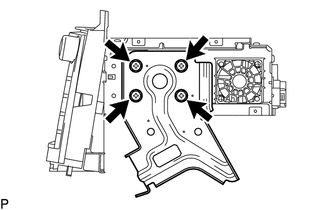
18. REMOVE NO. 2 RADIO RECEIVER BRACKET
|
(a) Remove the 4 screws and No. 2 radio receiver bracket. |
|
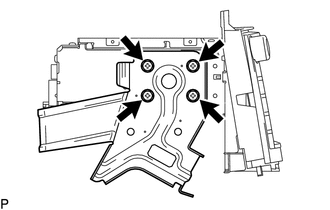
19. REMOVE RADIO AND DISPLAY RECEIVER ASSEMBLY
 Components
COMPONENTS
ILLUSTRATION
ILLUSTRATION
ILLUSTRATION
ILLUSTRATION
...
 Installation
INSTALLATION
PROCEDURE
1. INSTALL RADIO AND DISPLAY RECEIVER ASSEMBLY
2. INSTALL NO. 2 RADIO RECEIVER BRACKET
(a) Install the No. 2 radio receiver bracket with the 4 screws.
Torque:
5.0 N·m {5 ...
Other materials about Toyota Venza:
System Description
SYSTEM DESCRIPTION
1. CRUISE CONTROL SYSTEM
This system is controlled by the ECM, and is activated by the throttle position
sensor and motor. The ECM controls the following functions: ON-OFF, - SET, + RES,
CANCEL, vehicle speed control, motor output cont ...
System Diagram
SYSTEM DIAGRAM
Input and Output Signal of Each ECU
Transmitting ECU (transmitter)
Receiving ECU
Signal
Communication Method
Power management Control ECU
Steering Lock ECU (Steering Lock ...
Registered Device cannot be Deleted
PROCEDURE
1.
DELETE OPERATION
(a) Check if a registered portable player can be deleted normally.
OK:
Registered portable player can be deleted normally.
OK
END
NG
PROCEED TO ...

0.1146