
Toyota Venza: Rear Center Seat Inner Belt Assembly
Components
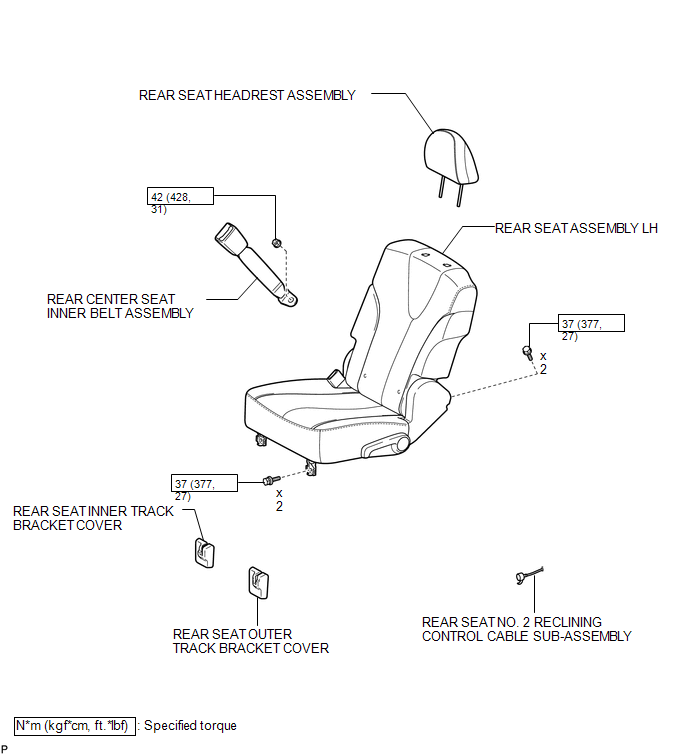
COMPONENTS
ILLUSTRATION
Removal
REMOVAL
PROCEDURE
1. REMOVE REAR SEAT HEADREST ASSEMBLY
.gif)
2. REMOVE REAR SEAT INNER TRACK BRACKET COVER
3. REMOVE REAR SEAT OUTER TRACK BRACKET COVER
4. DISCONNECT REAR SEAT NO. 2 RECLINING CONTROL CABLE SUB-ASSEMBLY
5. REMOVE REAR SEAT ASSEMBLY LH
6. REMOVE REAR CENTER SEAT INNER BELT ASSEMBLY
|
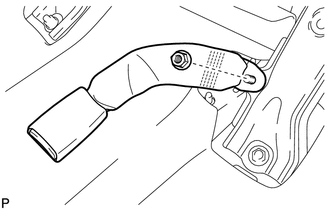
(a) Remove the nut and the rear center seat inner belt assembly. |
|
Installation
INSTALLATION
PROCEDURE
1. INSTALL REAR CENTER SEAT INNER BELT ASSEMBLY
|
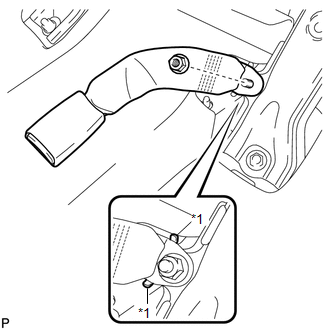
(a) Install the rear center seat inner belt assembly with the nut. Text in Illustration
Torque: 42 N·m {428 kgf·cm, 31 ft·lbf} NOTICE: Do not allow the anchor part of the rear seat outer belt assembly to overlap the protruding part of the floor panel. |
|
2. INSTALL REAR SEAT ASSEMBLY LH
.gif)
3. CONNECT REAR SEAT NO. 2 RECLINING CONTROL CABLE SUB-ASSEMBLY
4. INSTALL REAR SEAT INNER TRACK BRACKET COVER
5. INSTALL REAR SEAT OUTER TRACK BRACKET COVER
6. INSTALL REAR SEAT HEADREST ASSEMBLY
 Disposal
DISPOSAL
CAUTION / NOTICE / HINT
CAUTION:
Before performing pre-disposal deployment of any SRS component, review and closely
follow all applicable environmental and hazardous material regulations ...

Other materials about Toyota Venza:
Rear Door LH ECU Communication Stop (B2324)
DESCRIPTION
This DTC is stored when LIN communication between the power window regulator
motor assembly (for rear LH side) and main body ECU (driver side junction block
assembly) stops for more than 10 seconds.
DTC No.
DTC Detection ...
Inspection
INSPECTION
PROCEDURE
1. INSPECT REAR SHOCK ABSORBER ASSEMBLY
(a) Compress and extend the shock absorber rod 4 or more times.
Standard:
There is no abnormal resistance or sound and operation resistance is
normal.
...
Installation
INSTALLATION
PROCEDURE
1. TEMPORARILY INSTALL REAR STABILIZER BAR BRACKET LH (for Front Side)
(a) Temporarily install the rear stabilizer bar bracket LH (front side)
with the bolt.
HINT:
Loosely tighten the bolt so that the bracket can ...

0.1204