
Toyota Venza: Parts Location
PARTS LOCATION
ILLUSTRATION
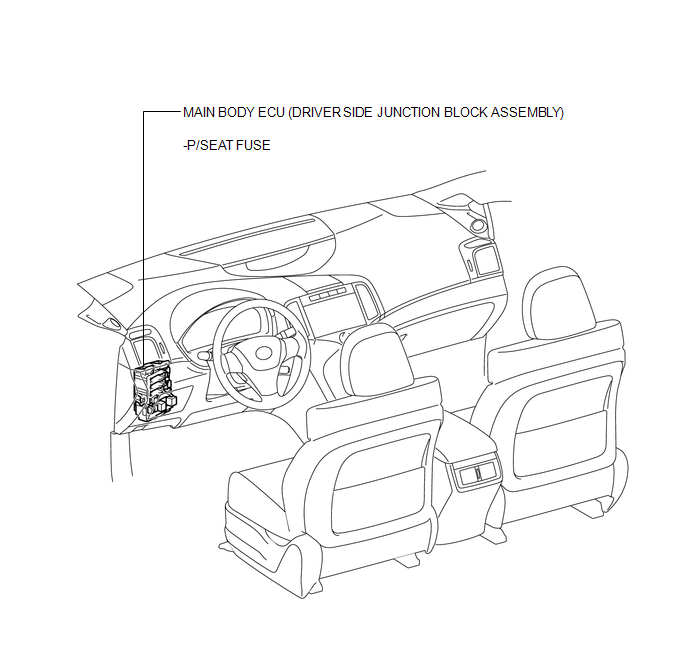
ILLUSTRATION
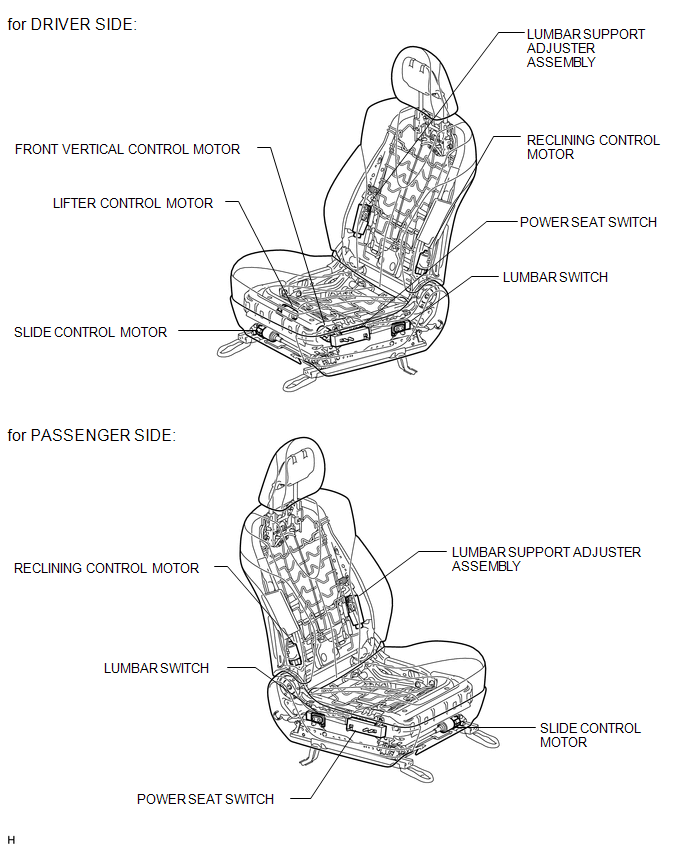
 Precaution
PRECAUTION
1. NOTICE FOR INITIALIZATION
HINT:
When disconnecting the cable from the negative (-) battery terminal, initialize
the following systems after the cable is reconnected.
Sys ...
 System Description
SYSTEM DESCRIPTION
1. FRONT POWER SEAT CONTROL SYSTEM DESCRIPTION
The driver seat is equipped with slide, reclining, lifter, front vertical and
lumbar support adjustment functions.
2. FUNCTION OF ...
Other materials about Toyota Venza:
Open in Occupant Classification ECU Battery Positive Line (B1794)
DESCRIPTION
This circuit consists of the occupant classification ECU and power source circuit
(battery, fuse and wire harness).
DTC B1794 is recorded when a malfunction is detected in the occupant classification
ECU or power source circuit.
HINT:
If DT ...
Installation
INSTALLATION
PROCEDURE
1. INSTALL MANUAL VALVE
(a) Coat the manual valve with ATF and install it to the transmission
valve body assembly.
2. INSTALL TRANSMISSION VALVE BODY ASSEMBLY
(a) Coat th ...
Installing child restraints using a seat belt (child restraint lock function
belt)
- Rear-facing -- Infant seat/convertible seat
Place the child restraint system on the rear seat facing the rear of the vehicle.
Run the seat belt through the child restraint system and insert the plate into
the buckle. Make sure that the belt is ...

0.1331