
Toyota Venza: Installation
INSTALLATION
PROCEDURE
1. INSTALL STEERING PAD
(a) Check that the ignition switch is off.
(b) Check that the cable is disconnected from the negative (-) battery terminal.
CAUTION:
Wait at least 90 seconds after disconnecting the cable from the negative (-) battery terminal to disable the SRS system.
|
(c) Connect the 2 airbag connectors to the steering pad. Text in Illustration
NOTICE:
|
|
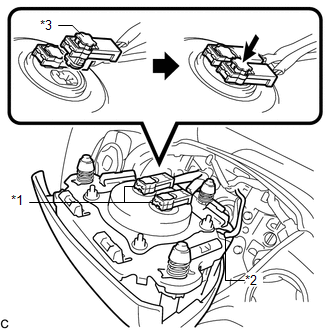
(d) Push in the 2 airbag connector locks to install the 2 airbag connectors.
(e) Connect the horn connector to the steering pad.
|
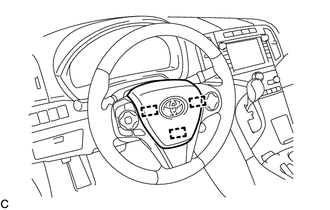
(f) Push the steering pad to engage the 3 pins carefully. NOTICE:
|
|
2. INSTALL LOWER NO. 3 STEERING WHEEL COVER
(a) Engage the claw and guide to install the lower No. 3 steering wheel cover.
3. INSTALL LOWER NO. 2 STEERING WHEEL COVER
(a) Engage the claw and guide to install the lower No. 2 steering wheel cover.
4. CONNECT CABLE TO NEGATIVE BATTERY TERMINAL
NOTICE:
When disconnecting the cable, some systems need to be initialized after the cable
is reconnected (See page .gif) ).
).
5. INSPECT STEERING PAD
(a) Make sure that the horn sounds.
HINT:
If the horn does not sound, inspect the horn system (See page
).
6. PERFORM DIAGNOSTIC SYSTEM CHECK
(See page )
7. INSPECT SRS WARNING LIGHT
(See page )
 On-vehicle Inspection
ON-VEHICLE INSPECTION
CAUTION / NOTICE / HINT
CAUTION:
Be sure to follow the correct removal and installation procedures of the steering
pad.
PROCEDURE
1. INSPECT STEERING PAD (Vehicle not Invo ...
 Removal
REMOVAL
PROCEDURE
1. PRECAUTION
CAUTION:
Be sure to read Precaution thoroughly before servicing (See page
).
NOTICE:
After turning the ignition switch off, waiting time may be required before ...
Other materials about Toyota Venza:
MIL Circuit
DESCRIPTION
The MIL (Malfunction Indicator Lamp) is used to indicate vehicle malfunctions
detected by the ECM. By turning the ignition switch to ON, power is supplied to
the MIL circuit, and the ECM provides the circuit ground which illuminates the MIL.
...
Data List / Active Test
DATA LIST / ACTIVE TEST
1. DATA LIST
HINT:
Using the Techstream to read the Data List allows the values or states of switches,
sensors, actuators and other items to be read without removing any parts. This non-intrusive
inspection can be very useful bec ...
Setting up the displays
Press the “SETUP” button while the
vehicle is stopped.
The “Custom Settings” screen is displayed on the multi-information display.
If left idle for approximately 10 seconds, the display will revert to the previous
screen.
Select “Display / ...

0.1662