
Toyota Venza: Installation
INSTALLATION
PROCEDURE
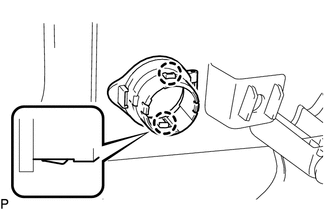
1. INSTALL REAR POWER POINT SOCKET COVER
|
(a) Engage the 2 claws to install the rear power point socket cover. |
|
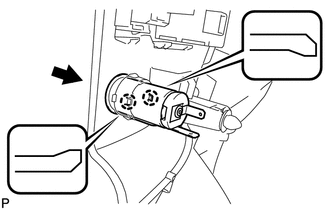
2. INSTALL REAR POWER POINT SOCKET ASSEMBLY
|
(a) Engage the 2 claws to install the rear power point socket assembly as shown in the illustration. |
|
3. INSTALL DECK TRIM SIDE PANEL ASSEMBLY RH
.gif)
4. CONNECT REAR SEAT OUTER BELT ASSEMBLY RH
HINT:
Use the same procedure for the RH side and the LH side (See page
).
5. INSTALL LUGGAGE HOLD BELT STRIKER ASSEMBLY
HINT:
Use the same procedure for the RH side and the LH side (See page
).
6. INSTALL RECLINING REMOTE CONTROL BEZEL RH
HINT:
Use the same procedure for the RH side and the LH side (See page
).
7. INSTALL REAR SEAT ASSEMBLY RH
8. CONNECT REAR SEAT RECLINING CONTROL CABLE
9. INSTALL REAR SEAT OUTER TRACK BRACKET COVER
10. INSTALL REAR SEAT INNER TRACK BRACKET COVER
11. INSTALL REAR SEAT CENTER HEADREST ASSEMBLY
12. INSTALL REAR SEAT HEADREST ASSEMBLY
13. INSTALL REAR FLOOR FINISH PLATE
14. INSTALL REAR SEAT SUB FLOOR PANEL ASSEMBLY
15. INSTALL NO. 1 DECK BOARD
16. INSTALL DECK SIDE TRIM BOX RH
17. INSTALL NO. 2 DECK BOARD SUB-ASSEMBLY
18. INSTALL DECK SIDE TRIM BOX LH
19. INSTALL NO. 3 DECK BOARD SUB-ASSEMBLY
20. INSTALL DECK BOARD ASSEMBLY
21. INSTALL TONNEAU COVER ASSEMBLY (w/ Tonneau Cover)
22. INSTALL REAR DOOR OPENING TRIM WEATHERSTRIP RH
HINT:
Use the same procedure for the RH side and the LH side (See page
).
23. INSTALL REAR DOOR SCUFF PLATE RH
HINT:
Use the same procedure for the RH side and the LH side (See page
).
 Components
COMPONENTS
ILLUSTRATION
ILLUSTRATION
ILLUSTRATION
ILLUSTRATION
...
 Removal
REMOVAL
PROCEDURE
1. REMOVE REAR DOOR SCUFF PLATE RH
HINT:
Use the same procedure for the RH side and the LH side (See page
).
2. REMOVE REAR DOOR OPENING TRIM WEATHERSTRIP RH
HINT:
Use the s ...
Other materials about Toyota Venza:
All Door Entry Lock/Unlock Functions do not Operate, but Wireless Functions
Operate
DESCRIPTION
When the wireless door lock and unlock functions operate, the communication circuit
between the door lock receiver assembly and certification ECU (smart key ECU assembly)
is normal. When the entry lock and unlock functions do not operate, radi ...
Power Source Control ECU Malfunction (B2782)
DESCRIPTION
The power management control ECU controls the power supply to activate the steering
lock motor. This prevents the steering wheel from being locked while the vehicle
is moving.
DTC No.
DTC Detecting Condition
T ...
Back Door Entry Lock and Unlock Functions do not Operate
DESCRIPTION
When the back door entry lock and unlock functions do not operate, one of the
following may be malfunctioning: 1) power door lock control system; 2) outside electrical
key oscillator (for rear side); 3) certification ECU (smart key ECU assembl ...

0.1294