
Toyota Venza: Inspection
INSPECTION
CAUTION / NOTICE / HINT
NOTICE:
Ensure that fingers or articles of clothing do not get caught in moving parts when performing this test.
PROCEDURE
1. INSPECT WINDSHIELD WIPER MOTOR ASSEMBLY
|
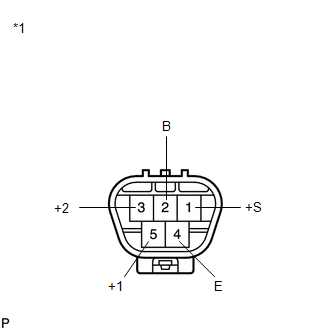
(a) Check the LO operation. (1) Connect a battery positive (+) lead to terminal 5 (+1) and a negative (-) lead to terminal 4 (E), and check that the motor operates at low speed (LO). OK: Motor operates at low speed (LO). Text in Illustration
|
|
(b) Check the HI operation.
(1) Connect a battery positive (+) lead to terminal 3 (+2) and a negative (-) lead to terminal 4 (E), and check that the motor operates at high speed (HI).
OK:
Motor operates at high speed (HI).
(c) Check the automatic stop (park) operation.
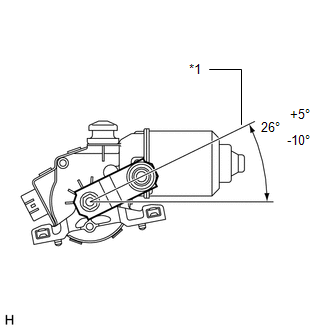
(1) Connect a battery positive (+) lead to terminal 5 (+1) and a negative (-) lead to terminal 4 (E). With the motor operating at low speed (LO), disconnect terminal 5 (+1) to stop the wiper motor operation at any position other than the matchmark.
(2) Using SST, connect terminals 1 (+S) and 5 (+1). Then connect a battery positive (+) lead to terminal 2 (B) and a negative (-) lead to terminal 4 (E) to restart the motor operation at low speed (LO).
SST: 09843-18040
|
(3) Check that the motor stops automatically at the automatic stop (park) position. OK: Motor stops automatically at the position. If the result is not as specified, replace the windshield wiper motor assembly. Text in Illustration
|
|
 On-vehicle Inspection
ON-VEHICLE INSPECTION
PROCEDURE
1. INSPECT WINDSHIELD WIPER MOTOR ASSEMBLY
(a) for RH Side
(1) Operate the windshield wiper motor assembly.
...
 Removal
REMOVAL
PROCEDURE
1. REMOVE FRONT WIPER ARM HEAD CAP
(a) Using a screwdriver, remove the 2 front wiper arm head caps as shown
in the illustration.
Text in Illustration
...
Other materials about Toyota Venza:
Pressure Sensor Circuit (B1423/23)
DESCRIPTION
This DTC is output when refrigerant pressure on the high pressure side is extremely
low (190 kPa (1.9 kgf/cm2, 28 psi) or less) or extremely high (3140 kPa (32.0 kgf/cm2,
455 psi) or more). The A/C pressure sensor is installed on the high pres ...
Road Test
ROAD TEST
1. PROBLEM SYMPTOM CONFIRMATION
(a) Inspect the SET function.
Text in Illustration
*1
ON/OFF
*2
- SET
(1) Turn the cruise control main switch on.
(2) Drive at the required speed of bet ...
Internal Control Module Throttle Position Performance (P060E)
MONITOR DESCRIPTION
The ECM monitors the input signals of the throttle position sensor No. 1 and
stop light switch. As the ECM monitors the input signals of the throttle position
sensor No. 1 and the STP signals of the stop light switch, if the input sign ...

0.1736