
Toyota Venza: Components
COMPONENTS
ILLUSTRATION
.png)
ILLUSTRATION
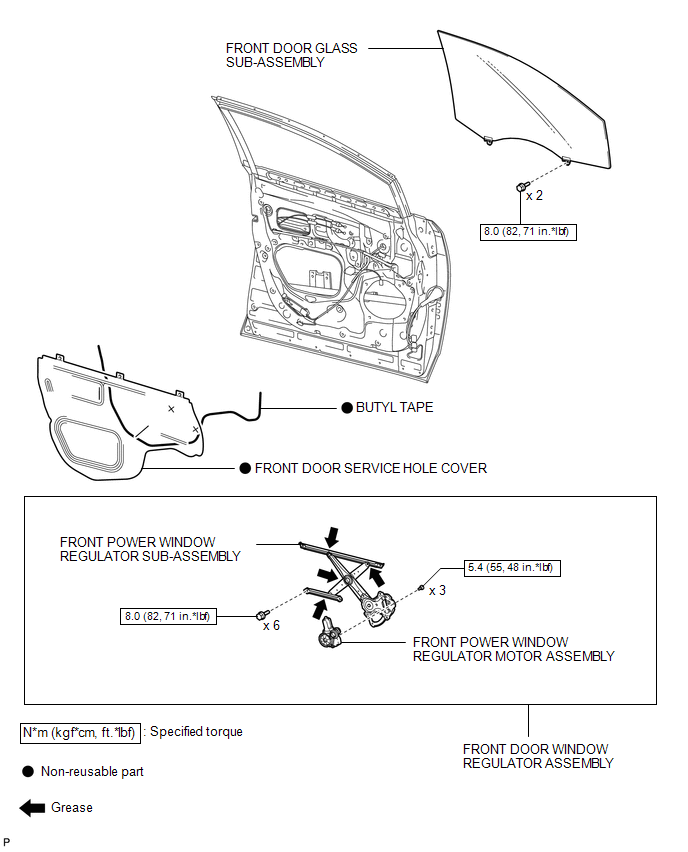

 Removal
REMOVAL
CAUTION / NOTICE / HINT
HINT:
Use the same procedure for the RH side and LH side.
The procedure listed below is for the LH side.
PROCEDURE
1. DISCONNECT CABLE FROM NEGAT ...
Other materials about Toyota Venza:
Components
COMPONENTS
ILLUSTRATION
ILLUSTRATION
ILLUSTRATION
ILLUSTRATION
ILLUSTRATION
...
Components
COMPONENTS
ILLUSTRATION
ILLUSTRATION
ILLUSTRATION
ILLUSTRATION
ILLUSTRATION
...
Driver Side Door Entry Unlock Function does not Operate
DESCRIPTION
If the driver door entry lock function operates normally, but its entry unlock
function does not, this means that the request code from the driver door is being
output normally. In this case, a malfunction in the touch sensor circuit (from the ...
© 2016-2026 Copyright www.tovenza.com

0.1143
0.1143