
Toyota Venza: Back door
The back door can be opened using the back door opener. The back door can be locked and unlocked using the entry function (vehicles with smart key system), wireless remote control or door lock switch.
In addition, the power back door (if equipped) can be opened using the power back door switch or wireless remote control.
- Unlocking and locking the back door
► Entry function (vehicles with smart key system)
► Wireless remote control
►Door lock switch
- Opening the back door from outside the vehicle
► Back door opener
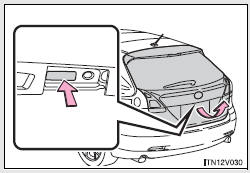
Raise the back door while pushing up the back door opener switch.
► Wireless remote control (vehicles with power back door)
- Opening the back door from inside the vehicle (vehicles with power back door)
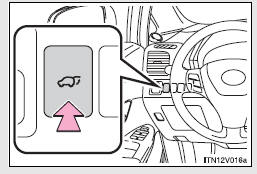
Push and hold the switch to open/close.
Pressing the switch again while the power back door is operating will cause the operation to reverse.
However, the reverse operation cannot be performed for the first second after pressing the switch to operate the door.
- When closing the back door
- Power back door switch (vehicles with power back door)
- Canceling the power back door system (vehicles with power back door)
 Automatic door locking and unlocking systems
The following functions can be set or canceled:
- Setting and canceling the functions
► Setting and canceling the functions
Vehicles with TFT type multi-information display The functi ...
 When closing the back door
Lower the back door using the back door handle, and make sure to push the back
door down from the outside to close it.
Be careful not to pull the back door sideways when closing the back door wit ...
Other materials about Toyota Venza:
Installation
INSTALLATION
PROCEDURE
1. INSTALL ECM
(a) Install the bracket to the ECM with the 5 screws.
(b) Install the ECM with the 3 bolts.
Torque:
8.0 N·m {82 kgf·cm, 71 in·lbf}
...
Components
COMPONENTS
ILLUSTRATION
ILLUSTRATION
ILLUSTRATION
ILLUSTRATION
ILLUSTRATION
ILLUSTRATION
ILLUSTRATION
ILLUSTRATION
ILLUSTRATION
ILLUSTRATION
ILLUSTRATION
...
Air Mix Damper Control Servo Motor Circuit (Driver Side) (B1446/46)
DESCRIPTION
The air mix control servo motor sends pulse signals to indicate the damper position
to the A/C amplifier. The A/C amplifier activates the motor (normal or reverse)
based on these signals to move the air mix damper (driver side) to any position ...

0.1757