
Toyota Venza: Automatic High Beam Mirror (B124A)
DESCRIPTION
The DTC is stored when the main body ECU (driver side junction block assembly) detects malfunctions in the inner rear view mirror assembly.
|
DTC No. |
DTC Detection Condition |
Trouble Area |
|---|---|---|
|
B124A |
Malfunction in inner rear view mirror assembly |
Inner rear view mirror assembly |
WIRING DIAGRAM
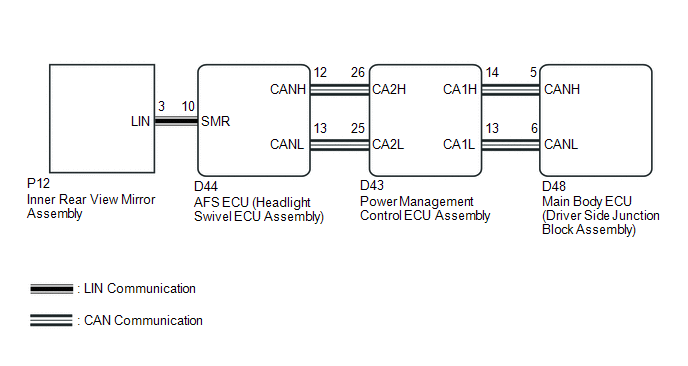
CAUTION / NOTICE / HINT
NOTICE:
First perform the communication function inspections in How to Proceed with Troubleshooting to confirm that there are no CAN communication malfunctions before troubleshooting this symptom.
PROCEDURE
|
1. |
CHECK FOR DTC |
(a) Clear the DTCs (See page .gif) ).
).
(b) Check for DTCs (See page ).
OK:
DTC B124A is not output.
| OK | .gif) |
USE SIMULATION METHOD TO CHECK |
| NG | |
REPLACE INNER REAR VIEW MIRROR ASSEMBLY |
 Lost Communication with ECM (U0101,U0073,U0126,U0129,U0142,U0182,U1000)
DESCRIPTION
The DTCs are stored when the CAN communication system is malfunctioning.
DTC No.
DTC Detection Condition
Trouble Area
U0101
L ...
 Automatic High Beam System (B124B)
DESCRIPTION
The DTC is stored when the main body ECU (driver side junction block assembly)
detects malfunctions in the automatic high beam system.
DTC No.
DTC Detection Condi ...
Other materials about Toyota Venza:
Oxygen (A/F) Sensor Heater Control Circuit Low (Bank 1 Sensor 1) (P0031,P0032,P101D)
DESCRIPTION
Refer to DTC P2195 (See page ).
HINT:
When any of these DTCs is stored, the ECM enters fail-safe mode. The
ECM turns off the air fuel ratio sensor heater in fail-safe mode. Fail-safe
mode continues until the ignition switch is t ...
Reverse Signal Circuit
DESCRIPTION
The radio and display receiver assembly receives a reverse signal from the park/neutral
position switch assembly.
WIRING DIAGRAM
PROCEDURE
1.
CHECK BACK-UP LIGHT
(a) Move the shift lever to R and check if th ...
Removal
REMOVAL
PROCEDURE
1. DISCONNECT CABLE FROM NEGATIVE BATTERY TERMINAL
NOTICE:
When disconnecting the cable, some systems need to be initialized after the cable
is reconnected (See page ).
2. REMOVE REAR DOOR INSIDE HANDLE BEZEL PLUG
3. REMOVE REAR P ...

0.1318