
Toyota Venza: Automatic air conditioning system
Airflow and outlets are automatically adjusted according to the temperature setting.
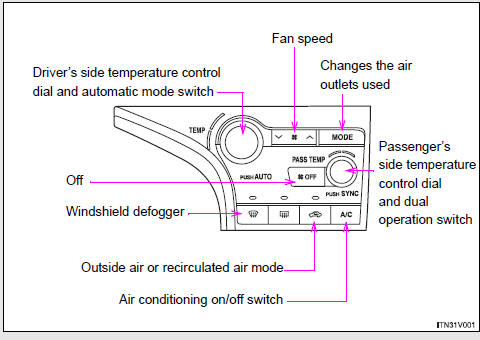
► Control panel
► Multi-information display (TFT type)
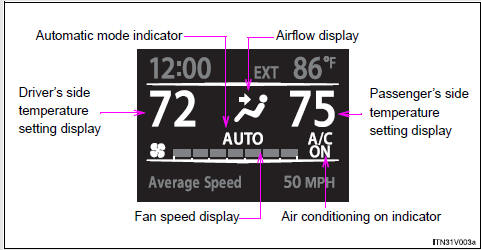
The settings display will differ according to the situation. If
 is pressed while in automatic mode,
the status of all settings will be displayed for a number of seconds.
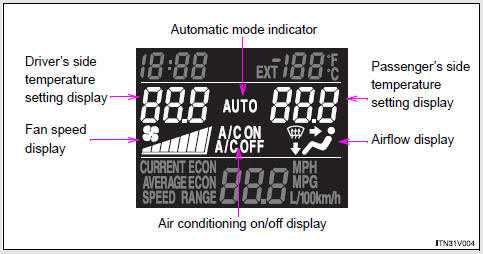
► Multi-information display (LCD type)
- Using the automatic mode
- Adjusting the settings
- Defogging the windshield
- Adjusting the position and opening and closing the air outlets

 Using the automatic mode
Press
.
The air conditioning system will begin to operate. In outside air or recirculated
air mode, air outlets, fan speed and air conditioning on/ off are automatically
adjusted according to ...
Other materials about Toyota Venza:
On-vehicle Inspection
ON-VEHICLE INSPECTION
PROCEDURE
1. INSPECT REAR COMBINATION LIGHT ASSEMBLY
(a) Disconnect the connector from the rear combination light assembly.
(b) Measure the voltage according to the value(s) in ...
Short in Curtain Shield Squib LH Circuit (B1835/58-B1838/58)
DESCRIPTION
The curtain shield squib LH circuit consists of the center airbag sensor assembly
and curtain shield airbag assembly LH.
The center airbag sensor assembly uses this circuit to deploy the airbag when
deployment conditions are met.
These DTCs ...
No Sound can be Heard from Speakers
PROCEDURE
1.
CHECK AUDIO SETTINGS
(a) In sound output setting mode, set volume, fader and balance to the initial
values and check that the sound is normal.
OK:
Audio system returns to normal.
HINT:
Sound quality adjustm ...

0.1734