
Toyota Venza: Removal
REMOVAL
PROCEDURE
1. DISCONNECT CABLE FROM NEGATIVE BATTERY TERMINAL
NOTICE:
When disconnecting the cable, some systems need to be initialized after the cable
is reconnected (See page .gif) ).
).
2. REMOVE REAR DOOR INSIDE HANDLE BEZEL PLUG
3. REMOVE REAR POWER WINDOW REGULATOR SWITCH ASSEMBLY WITH REAR DOOR ARMREST BASE PANEL
4. REMOVE REAR DOOR TRIM BOARD SUB-ASSEMBLY
5. REMOVE REAR DOOR INSIDE HANDLE SUB-ASSEMBLY
6. REMOVE REAR DOOR SERVICE HOLE COVER
7. REMOVE REAR DOOR CHECK ASSEMBLY
8. REMOVE REAR DOOR WEATHERSTRIP
9. REMOVE REAR DOOR GLASS RUN
10. REMOVE REAR DOOR WINDOW DIVISION BAR SUB-ASSEMBLY
11. REMOVE REAR DOOR GLASS SUB-ASSEMBLY
12. REMOVE REAR DOOR BELT MOULDING
|
(a) Put protective tape around the rear door belt moulding. Text in Illustration
|
|
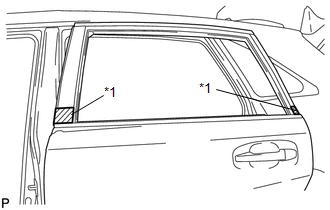
|
(b) Using a screwdriver, disengage the 5 claws and remove the rear door belt moulding. |
|
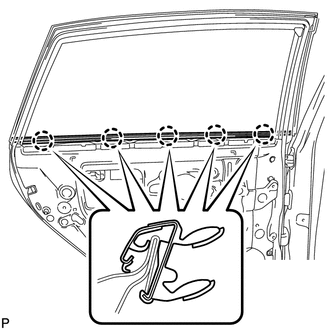
 Components
COMPONENTS
ILLUSTRATION
ILLUSTRATION
...
 Installation
INSTALLATION
PROCEDURE
1. INSTALL REAR DOOR BELT MOULDING
(a) Engage the 5 claws to install the rear door belt moulding.
2. INSTALL REAR D ...
Other materials about Toyota Venza:
Check Mode Procedure
CHECK MODE PROCEDURE
1. CHECK MODE (SIGNAL CHECK): DTC CHECK
(a) Turn the ignition switch off.
(b) Connect the Techstream to the DLC3.
(c) Turn the ignition switch to ON.
(d) Turn the Techstream on.
(e) Enter the following menus: Body Electrical / SRS Ai ...
Precaution
PRECAUTION
1. PRECAUTION FOR DISCONNECTING CABLE FROM NEGATIVE BATTERY TERMINAL
NOTICE:
When disconnecting the cable from the negative (-) battery terminal, initialize
the following system after the cable is reconnected.
System Name
...
Dtc Check / Clear
DTC CHECK / CLEAR
1. CHECK DTC
(a) Connect the Techstream to the DLC3.
(b) Turn the ignition switch to ON.
(c) Turn the Techstream on.
(d) Enter the following menus: Body Electrical / Back Door / DTC.
HINT:
Refer to the Techstream operator's manual ...

0.1326