
Toyota Venza: Reassembly
REASSEMBLY
PROCEDURE
1. INSTALL GENERATOR ROTOR ASSEMBLY
|
(a) Place the generator drive end frame on the generator pulley. |
|
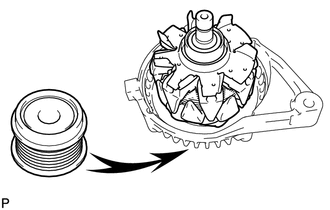
(b) Install the generator rotor to the generator drive end frame.
|
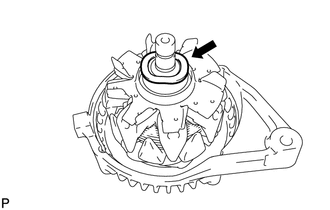
(c) Place the washer on the generator rotor. |
|
2. INSTALL GENERATOR COIL ASSEMBLY
|
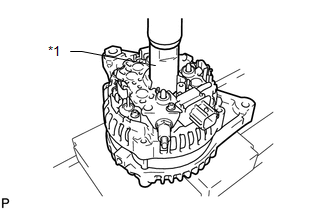
(a) Using a 21 mm socket wrench and a press, slowly press in the generator coil. Text in Illustration
|
|
|
(b) Install the 4 bolts. Torque: 5.9 N·m {60 kgf·cm, 52 in·lbf} |
|
.png)
3. INSTALL GENERATOR BRUSH HOLDER ASSEMBLY
|
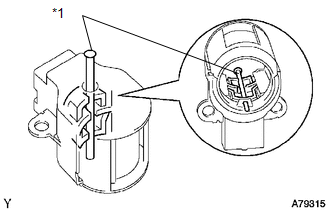
(a) While pushing the 2 brushes into the generator brush holder, insert a 1.0 mm (0.0394 in.) pin into the generator brush holder. Text in Illustration
|
|
|
(b) Install the generator brush holder with the 2 screws. Text in Illustration
Torque: 1.8 N·m {18 kgf·cm, 16 in·lbf} |
|
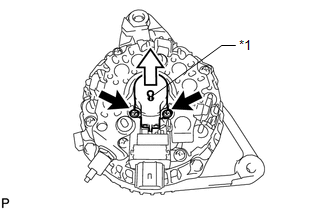
(c) Pull the pin out of the generator brush holder.
4. INSTALL GENERATOR REAR END COVER
|
(a) Install the terminal insulator onto the generator coil assembly. |
|
.png)
|
(b) Install the generator rear end cover with the 3 nuts. Torque: 4.6 N·m {47 kgf·cm, 41 in·lbf} |
|
.png)
5. INSTALL GENERATOR PULLEY WITH CLUTCH
(a) Temporarily install the generator pulley by hand.
(b) Mount the generator in a vise.
|
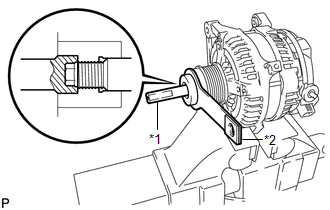
(c) Install SST (A) and (B) to the generator pulley as shown in the illustration. Text in Illustration
SST: 09820-63021 |
|
|
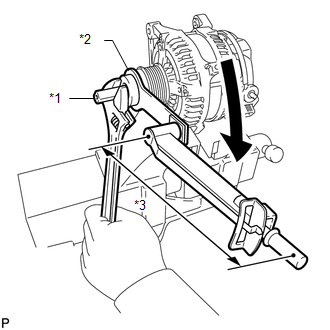
(d) Using a wrench to hold SST (A), turn SST (B) clockwise to tighten the generator pulley. Text in Illustration
Torque: without SST : 80 N·m {816 kgf·cm, 59 ft·lbf} with SST : 58 N·m {591 kgf·cm, 43 ft·lbf} NOTICE:
|
|
(e) Check that the generator pulley rotates smoothly.
6. INSTALL GENERATOR PULLEY CAP
|
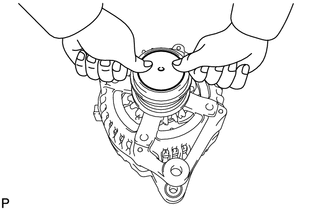
(a) Install a new generator pulley cap to the pulley. |
|
 Inspection
INSPECTION
PROCEDURE
1. INSPECT GENERATOR PULLEY WITH CLUTCH
(a) Hold the center of the pulley, and confirm that the outer ring turns
counterclockwise and does not turn clockwise.
...
 Installation
INSTALLATION
PROCEDURE
1. INSTALL GENERATOR ASSEMBLY
(a) Install the generator with the 2 bolts.
Torque:
52 N·m {530 kgf·cm, 38 ft·lbf}
...
Other materials about Toyota Venza:
Room Oscillator does not Recognize Key
DESCRIPTION
If the room oscillator does not recognize a key, one of the following may be
the cause: 1) communication between the indoor electrical key oscillator (for front
floor) and key cannot be performed; 2) communication between the indoor electrical ...
Adjustment
ADJUSTMENT
CAUTION / NOTICE / HINT
CAUTION:
Before adjusting the door positions of vehicles equipped with side and curtain
shield airbags, be sure to disconnect the battery. After adjustment, check that
the SRS warning light is operating normally and ...
No Sound can be Heard from Speakers
PROCEDURE
1.
CHECK AUDIO SETTINGS
(a) In sound output setting mode, set volume, fader and balance to the initial
values and check that the sound is normal.
OK:
Audio system returns to normal.
HINT:
Sound quality adjustm ...

0.1294