
Toyota Venza: Back Door Opener Switch
Components
COMPONENTS
ILLUSTRATION
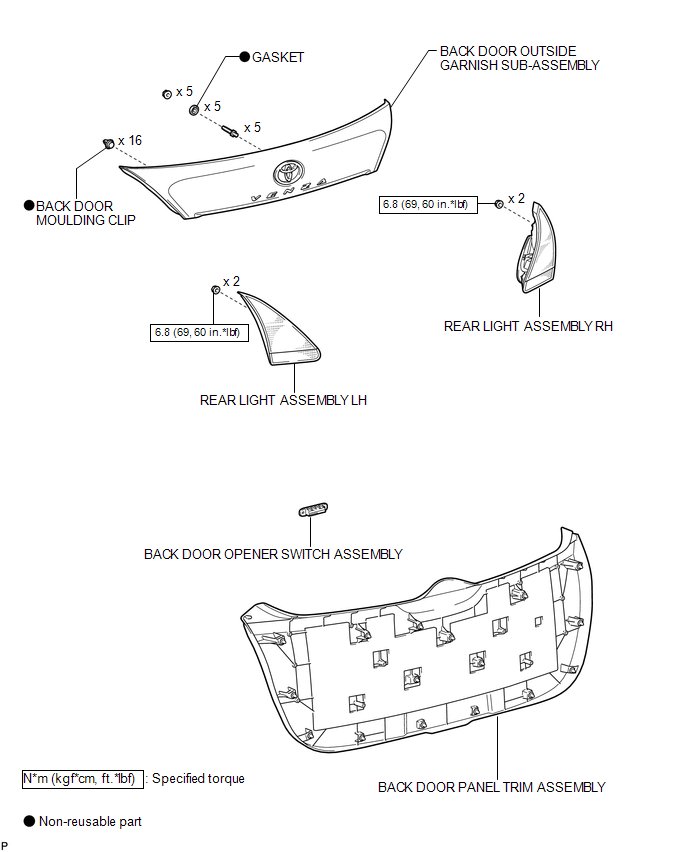
Removal
REMOVAL
PROCEDURE
1. REMOVE BACK DOOR PANEL TRIM ASSEMBLY
.gif)
2. REMOVE REAR LIGHT ASSEMBLY LH
3. REMOVE REAR LIGHT ASSEMBLY RH
HINT:
Use the same procedure for the RH side and LH side.
4. REMOVE BACK DOOR OUTSIDE GARNISH SUB-ASSEMBLY
5. REMOVE BACK DOOR OPENER SWITCH ASSEMBLY
|
(a) Remove the back door opener switch assembly. |
|
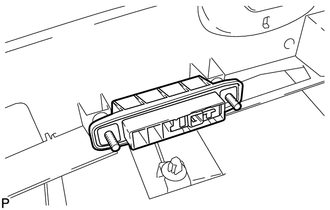
Inspection
INSPECTION
PROCEDURE
1. INSPECT BACK DOOR OPENER SWITCH ASSEMBLY
(a) Check operation of the opener switch.
(1) Measure the resistance according to the value(s) in the table below.
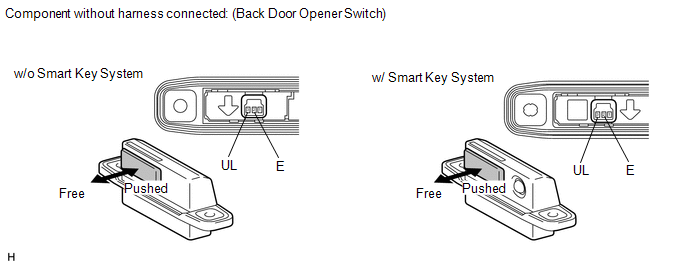
Standard resistance:
|
Tester Connection |
Switch Position |
Specified Condition |
|---|---|---|
|
2(E) - 3(UL) |
Back door opener switch not pushed (OFF) |
10 kΩ or higher |
|
2(E) - 3(UL) |
Back door opener switch pushed (ON) |
Below 1 Ω |
If the result is not specified, replace the back door opener switch assembly.
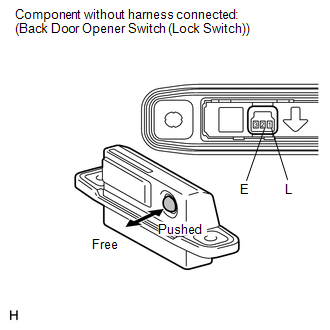
(b) Check operation of the lock switch (w/ Smart Key System).
|
(1) Measure the resistance according to the value(s) in the table below. Standard resistance:
If the result is not specified, replace the back door opener switch assembly. |
|
Installation
INSTALLATION
PROCEDURE
1. INSTALL BACK DOOR OPENER SWITCH ASSEMBLY
|
(a) Install the back door opener switch assembly. |
|
.png)
2. INSTALL BACK DOOR OUTSIDE GARNISH SUB-ASSEMBLY
.gif)
3. INSTALL REAR LIGHT ASSEMBLY LH
4. INSTALL REAR LIGHT ASSEMBLY RH
HINT:
Use the same procedure for the RH side and LH side.
5. INSTALL BACK DOOR PANEL TRIM ASSEMBLY
 Back Door Closer does not Operate
DESCRIPTION
When the back door closer does not operate, one of the following may be the cause:
1) improper fit of the back door, or a foreign object is stuck in the back door
or 2) initialization ...
 Back Door Support
Components
COMPONENTS
ILLUSTRATION
Removal
REMOVAL
PROCEDURE
1. REMOVE BACK DOOR STAY ASSEMBLY
NOTICE:
Avoid touching the piston rod as much as possible to prevent foreign
ma ...
Other materials about Toyota Venza:
Diagnostic Trouble Code Chart
DIAGNOSTIC TROUBLE CODE CHART
Power Window Control System
DTC Code
Detection Item
Trouble Area
See page
B2311
Power Window Motor Malfunction
1. Battery disconnected when ignit ...
If the engine will not start
If the engine still does not start after following the correct starting procedure
(, 175) or releasing the steering lock (, 176), confirm the following points.
- The engine will not start even if you are carrying the correct key.
One of the followi ...
Cellular Phone Registration Failure
PROCEDURE
1.
CHECK USAGE CONDITION
(a) Check that the vehicle and cellular phone meet the following conditions:
NOTICE:
If changing cellular phone settings, updating software, etc. is necessary, make
sure to obtain the per ...

0.1553