
Toyota Venza: Wireless Door Lock Buzzer
Components
COMPONENTS
ILLUSTRATION
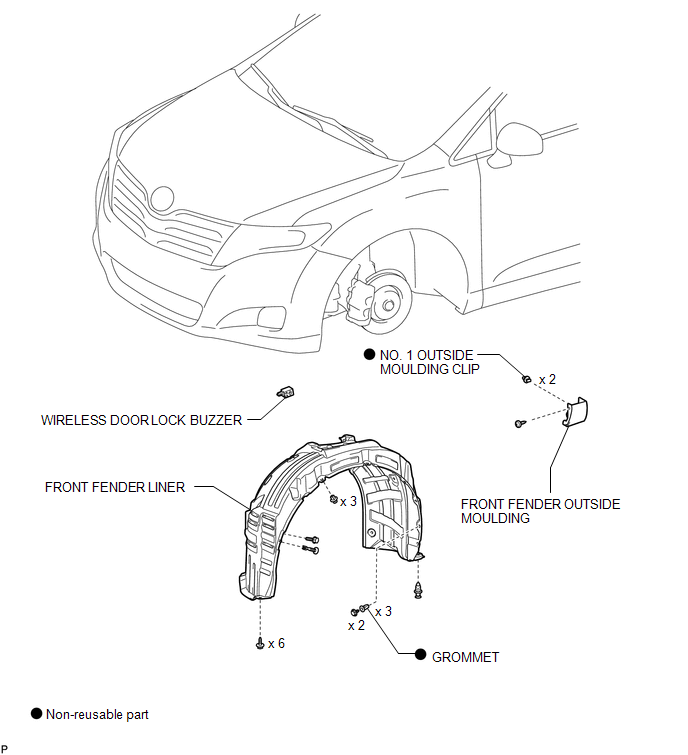
Installation
INSTALLATION
PROCEDURE
1. INSTALL WIRELESS DOOR LOCK BUZZER
|
(a) Engage the clamp and install the wireless door lock buzzer. |
|
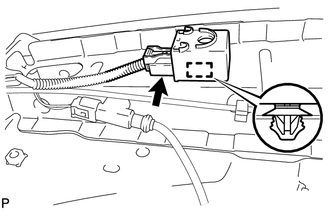
(b) Connect the connector.
2. INSTALL FRONT FENDER LINER
.gif)
3. INSTALL FRONT FENDER OUTSIDE MOULDING
4. INSTALL FRONT WHEEL
Removal
REMOVAL
PROCEDURE
1. REMOVE FRONT WHEEL
2. REMOVE FRONT FENDER OUTSIDE MOULDING
.gif)
3. REMOVE FRONT FENDER LINER
4. REMOVE WIRELESS DOOR LOCK BUZZER
|
(a) Disconnect the connector. |
|
.png)
(b) Disengage the clamp and remove the wireless door lock buzzer.
 Installation
INSTALLATION
PROCEDURE
1. INSTALL UNLOCK WARNING SWITCH
(a) Engage the 2 claws and install the unlock warning switch to the steering
column upper bracket.
...

Other materials about Toyota Venza:
Abbreviations Used In Manual
ABBREVIATIONS USED IN MANUAL
Abbreviation
Meaning
ABS
Anti-Lock Brake System
A/C
Air Conditioner
AC
Alternating Current
ACC
A ...
Removal
REMOVAL
PROCEDURE
1. REMOVE REAR DOOR SCUFF PLATE LH
2. REMOVE REAR DOOR OPENING TRIM WEATHERSTRIP LH
3. REMOVE TONNEAU COVER ASSEMBLY (w/ Tonneau Cover)
4. REMOVE DECK BOARD ASSEMBLY
5. REMOVE NO. 3 DECK BOARD SUB-ASSEMBLY
6. REMOVE DECK ...
Rear Right Sensor Malfunction (C1AE9)
DESCRIPTION
The No. 1 ultrasonic sensor (rear right sensor) is installed on the rear bumper.
The ECU detects obstacles based on signals received from the No. 1 ultrasonic sensor
(rear right sensor). If the No. 1 ultrasonic sensor (rear right sensor) has a ...

0.1591