
Toyota Venza: Ultrasonic Sensor(for Front Side)
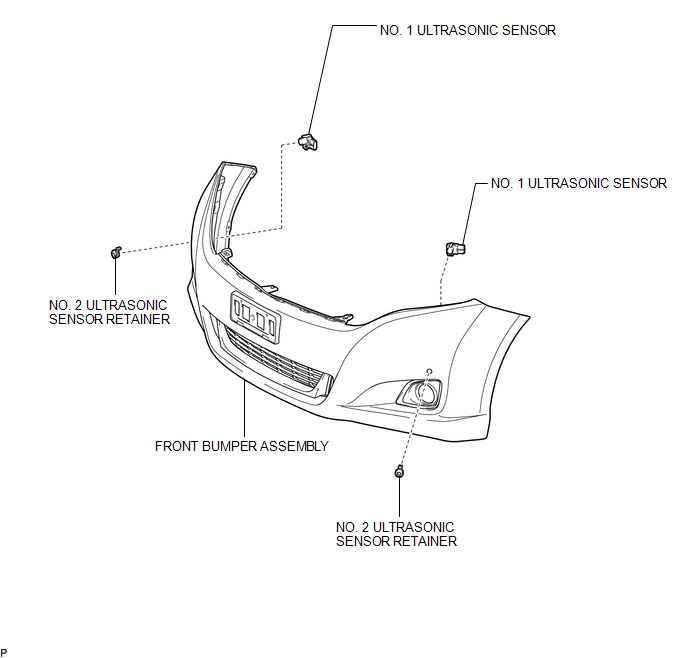
Components
COMPONENTS
ILLUSTRATION
Removal
REMOVAL
PROCEDURE
1. REMOVE FRONT BUMPER ASSEMBLY
(See page .gif) )
)
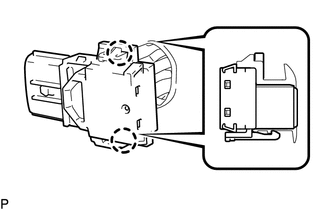
2. REMOVE NO. 1 ULTRASONIC SENSOR
|
(a) Disengage the 2 claws to remove the No. 1 ultrasonic sensor. HINT: Use the same procedure for the RH side and LH side. |
|
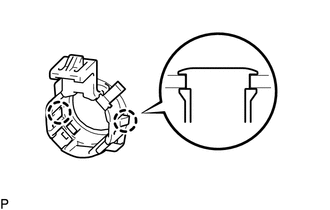
3. REMOVE NO. 2 ULTRASONIC SENSOR RETAINER
|
(a) Disengage the 2 claws to remove the No. 2 ultrasonic sensor retainer from the front bumper assembly. HINT: Use the same procedure for the RH side and LH side. |
|
Inspection
INSPECTION
PROCEDURE
1. INSPECT NO. 1 ULTRASONIC SENSOR
|
(a) Measure the resistance according to the value(s) in the table below. Standard Resistance:
If the result is not as specified, replace the No. 1 ultrasonic sensor. |
|
.png)
Installation
INSTALLATION
PROCEDURE
1. INSTALL NO. 2 ULTRASONIC SENSOR RETAINER
|
(a) Engage the 2 claws to install the No. 2 ultrasonic sensor retainer to the front bumper assembly. Text in Illustration
NOTICE:
HINT:
|
|
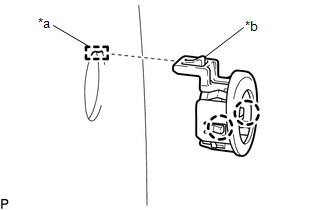
2. INSTALL NO. 1 ULTRASONIC SENSOR
(a) Engage the 2 claws to install the No. 1 ultrasonic sensor to the No. 2 ultrasonic sensor retainer.
NOTICE:
Push the No. 2 ultrasonic sensor retainer from the outside of the front bumper assembly when there is a gap between the No. 2 ultrasonic sensor retainer and the front bumper assembly surface. In this case, do not push on the No. 1ultrasonic sensor.
HINT:
Use the same procedure for the RH side and LH side.
3. INSTALL FRONT BUMPER ASSEMBLY
(See page .gif) )
)
 Television Camera
Components
COMPONENTS
ILLUSTRATION
ILLUSTRATION
Removal
REMOVAL
PROCEDURE
1. REMOVE BACK DOOR PANEL TRIM ASSEMBLY
2. REMOVE REAR WIPER ARM HEAD CAP
3. REMOVE REAR WIPER ARM AND ...

Other materials about Toyota Venza:
Reassembly
REASSEMBLY
PROCEDURE
1. INSTALL REAR CONSOLE ARMREST ASSEMBLY
(a) Temporarily install the rear console armrest assembly.
(b) Push in the box door hinge shafts by hand as far as possible.
HINT:
The illustration is for the LH sid ...
Power windows
The power windows can be opened and closed using the following switches.
1. One-touch closing*
2. Closing
3. One-touch opening*
4. Opening
*:To stop the window partway, operate the switch in the opposite direction.
Lock switch
Press the switch down ...
Lost Communication with ECM (U0100-U0142,U0155)
DESCRIPTION
DTC No.
DTC Detecting Condition
Trouble Area
U0100
No communication with ECM
CAN communication system
ECM
U0131
No commu ...

0.1599