
Toyota Venza: Calibration
CALIBRATION
1. SELECT COMPASS DISPLAY MODE
(a) The AUTO switch allows selection of the compass display.
2. PERFORM CALIBRATION
(a) Because each vehicle has its own magnetic field, calibration should be performed. The calibration function is used to compensate for the residual magnetism of the vehicle.
3. WHEN COMPASS IS MAGNETIZED
(a) The compass or vehicle may become magnetized while the vehicle is being shipped. As a result, it is necessary to perform calibration for the compass before the vehicle is delivered to the customer. If calibration cannot be performed successfully (calibration cannot be completed in spite of driving around several times), it may caused by excessive magnetization of the vehicle. Demagnetize the vehicle using a demagnetizer and perform calibration again.
4. SET COMPASS
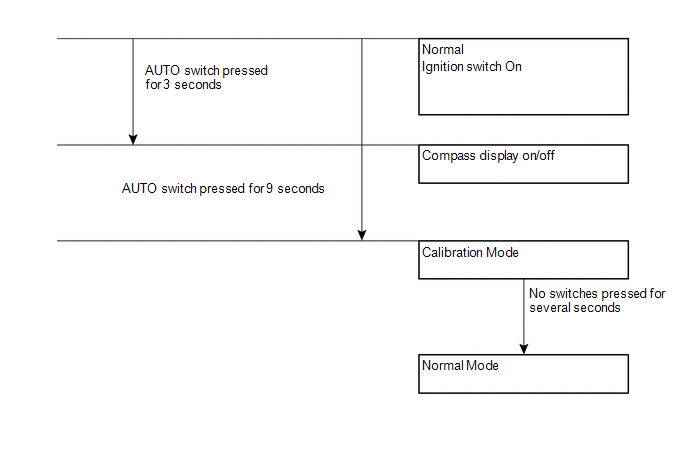
5. CALIBRATION MODE
(a) When the compass is in normal mode, pressing the AUTO switch for 9 seconds will activate the calibration mode.
(b) Drive the vehicle in a circle at a speed of 8 km/h (5 mph) or less.
(c) After driving around in a circle 1 to 3 times, the direction (N, NE, E, SE, S, SW, W or NW) will be displayed on the compass display. This indicates that calibration has finished.
HINT:
After calibration is performed, it is not necessary to repeat the calibration procedure unless magnetic field of the vehicle changes drastically. If the magnetic field changes drastically, the compass display will indicate "C".
 System Diagram
SYSTEM DIAGRAM
...
 Problem Symptoms Table
PROBLEM SYMPTOMS TABLE
Use the table below to help determine the cause of problem symptoms. If multiple
suspected areas are listed, the potential causes of the symptoms are listed in order
of pro ...
Other materials about Toyota Venza:
Horn System
Precaution
PRECAUTION
NOTICE:
When disconnecting the cable from the negative (-) battery terminal, initialize
the following system after the cable is reconnected.
System Name
See Procedure
Back Door Closer System
...
Installation
INSTALLATION
CAUTION / NOTICE / HINT
NOTICE:
When disconnecting the steering intermediate shaft assembly and pinion shaft
of steering gear assembly, be sure to place matchmarks before servicing.
PROCEDURE
1. INSTALL TIE ROD ASSEMBLY LH
(a) I ...
Insufficient Coolant Temperature for Closed Loop Fuel Control (P0125)
DESCRIPTION
Refer to DTC P0115 (See page ).
DTC No.
DTC Detection Condition
Trouble Area
P0125
The engine coolant temperature does not reach the closed loop enabling
temperature for 20 minutes ...

0.1586