
Toyota Venza: Removal
REMOVAL
CAUTION / NOTICE / HINT
HINT:
- Use the same procedure for the RH side and LH side.
- The procedure listed below is for the LH side.
PROCEDURE
1. REMOVE REAR WHEEL
2. SEPARATE REAR SPEED SENSOR
|
(a) Remove the bolt and separate the rear speed sensor from the rear axle carrier sub-assembly. NOTICE: Keep the sensor tip and rear speed sensor installation hole free of foreign matter. |
|
.png)
3. REMOVE REAR AXLE SHAFT NUT
.gif)
4. SEPARATE REAR DISC BRAKE CALIPER ASSEMBLY
5. REMOVE REAR DISC
6. REMOVE REAR AXLE HUB AND BEARING ASSEMBLY
|
(a) Put matchmarks on the rear drive shaft assembly and rear axle hub and bearing assembly. Text in Illustration
NOTICE: Do not punch the matchmarks. |
|
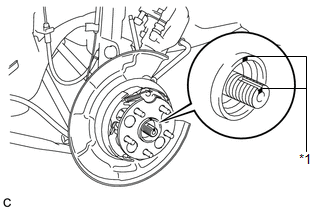
|
(b) Using a plastic hammer, separate the rear drive shaft assembly from the axle hub and bearing assembly. If it is difficult to separate, tap the end of the rear drive shaft assembly using a brass bar and a hammer. |
|
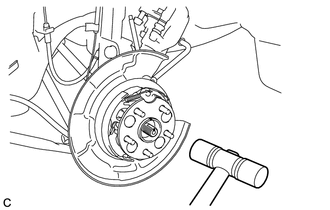
|
(c) Remove the 4 bolts and the rear axle hub and bearing assembly. NOTICE:
|
|
.png)
 Installation
INSTALLATION
CAUTION / NOTICE / HINT
HINT:
Use the same procedure for the RH side and LH side.
The procedure listed below is for the LH side.
PROCEDURE
1. INSTALL REAR AXLE HUB ...

Other materials about Toyota Venza:
Installation
INSTALLATION
PROCEDURE
1. INSTALL CHARCOAL CANISTER LEAK DETECTION PUMP SUB-ASSEMBLY
(a) Engage the 2 claws to install a new charcoal canister leak detection
pump sub-assembly to the charcoal canister assembly.
NOTICE:
Do n ...
How To Proceed With Troubleshooting
HOW TO PROCEED WITH TROUBLESHOOTING
1. OPERATION FLOW
HINT:
Perform troubleshooting in accordance with the procedure below. The following
is an outline of basic troubleshooting procedure. Confirm the troubleshooting procedure
for the circuit you are wor ...
Installation
INSTALLATION
PROCEDURE
1. INSTALL YAW RATE AND ACCELERATION SENSOR
(a) Install the yaw rate and acceleration sensor to the bracket with
the 2 nuts.
Torque:
5.0 N·m {51 kgf·cm, 44 in·lbf}
...

0.1596