
Toyota Venza: Removal
REMOVAL
CAUTION / NOTICE / HINT
HINT:
When installing new name plates and emblem, heat the vehicle body, name plates and emblem using a heat light.
Heating Temperature|
Item |
Temperature |
|---|---|
|
Vehicle Body |
40 to 60°C (104 to 140°F) |
|
Emblem, Name Plate |
20 to 30°C (68 to 86°F) |
NOTICE:
Do not heat the vehicle body, name plates or emblem excessively.
PROCEDURE
1. REMOVE HOOD EMBLEM
|
(a) Put protective tape around the hood emblem. Text in Illustration
|
|
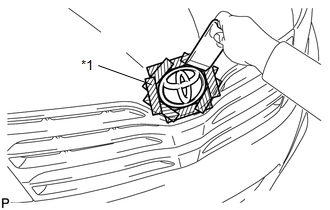
(b) Using a moulding remover, peel off the double-sided tape to remove the hood emblem.
NOTICE:
- If reusing the emblem, take care not to damage the hood emblem.
- Be careful not to damage the vehicle body.
2. REMOVE NO. 1 BACK DOOR EMBLEM
|
(a) Put protective tape around the No. 1 back door emblem. Text in Illustration
|
|
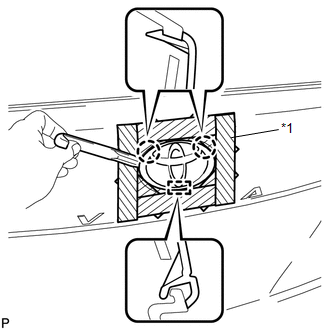
(b) Using a moulding remover, disengage the 2 claws.
NOTICE:
- If reusing the emblem, take care not to damage the No. 1 back door emblem.
- Be careful not to damage the vehicle body.
(c) Disengage the guide and remove the No. 1 back door emblem.
3. REMOVE NO. 2 BACK DOOR NAME PLATE
|
(a) Put protective tape around the No. 2 back door name plate. Text in Illustration
|
|
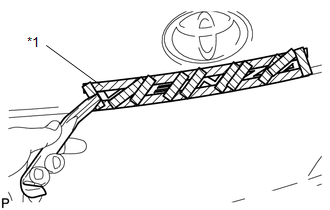
(b) Using a moulding remover, peel off the double-sided tape to remove the No. 2 back door name plate.
NOTICE:
- If reusing the name plate, take care not to damage the No. 2 back door name plate.
- Be careful not to damage the vehicle body.
4. REMOVE NO. 3 BACK DOOR NAME PLATE (for AWD)
|
(a) Put protective tape around the No. 3 back door name plate. Text in Illustration
|
|
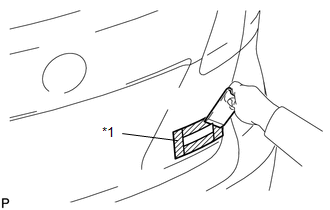
(b) Using a moulding remover, peel off the double-sided tape to remove the No. 3 back door name plate.
NOTICE:
- If reusing the name plate, take care not to damage the No. 3 back door name plate.
- Be careful not to damage the vehicle body.
5. REMOVE NO. 4 LUGGAGE COMPARTMENT DOOR PLATE (w/ Grade Mark)
|
(a) Put protective tape around the No. 4 luggage compartment door plate. Text in Illustration
|
|
(b) Using a moulding remover, peel off the double-sided tape to remove the No. 4 luggage compartment door plate.
NOTICE:
- If reusing the door plate, take care not to damage the No. 4 luggage compartment door plate.
- Be careful not to damage the vehicle body.
 Components
COMPONENTS
ILLUSTRATION
...
 Installation
INSTALLATION
CAUTION / NOTICE / HINT
HINT:
When installing new name plates and emblem, heat the vehicle body, name plates
and emblem using a heat light.
Heating Temperature
Item
...
Other materials about Toyota Venza:
Driver Side Door Entry Unlock Function does not Operate
DESCRIPTION
If the driver door entry lock function operates normally, but its entry unlock
function does not, this means that the request code from the driver door is being
output normally. In this case, a malfunction in the touch sensor circuit (from the ...
Installation
INSTALLATION
CAUTION / NOTICE / HINT
NOTICE:
Do not replace the spiral cable with the battery connected and the ignition
switch ON.
Do not rotate the spiral cable without the steering wheel with the battery
connected and the ignition swi ...
Precaution
PRECAUTION
NOTICE:
When disconnecting the cable from the negative (-) battery terminal, initialize
the following systems after the cable is reconnected.
System Name
See Procedure
Back Door Closer System
...

0.1323