
Toyota Venza: Removal
REMOVAL
PROCEDURE
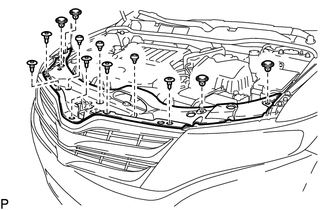
1. REMOVE COOL AIR INTAKE DUCT SEAL
|
(a) Using a clip remover, remove the 12 clips and cool air intake duct seal. |
|
2. REMOVE RADIATOR GRILLE
.gif)
3. REMOVE FRONT BUMPER ASSEMBLY
|
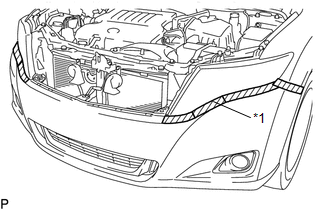
(a) Put protective tape around the front bumper assembly. Text in Illustration
|
|
|
(b) Remove the 2 bolts and 6 screws. |
|
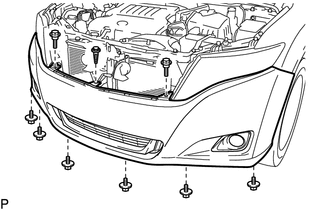
(c) Using a clip remover, remove the clip.
|
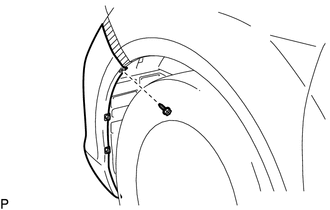
(d) Remove the screw. HINT: Use the same procedure for the RH side and LH side. |
|
|
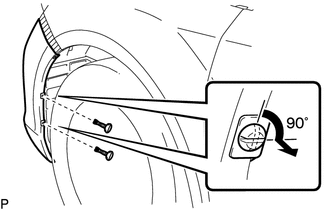
(e) Using a screwdriver, turn the 2 pins 90 degrees and remove the 2 pin hold clips. HINT: Use the same procedure for the RH side and LH side. |
|
|
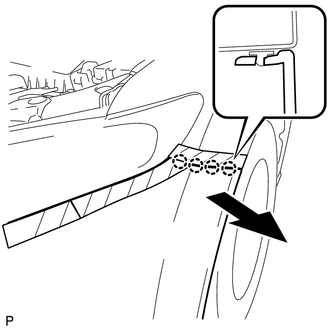
(f) Disengage the 4 claws and remove the front bumper assembly. HINT: Use the same procedure for the RH side and LH side. |
|
(g) Disconnect each connector.
|
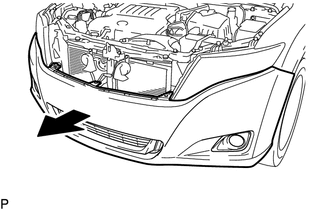
(h) Remove the front bumper assembly as shown in the illustration. |
|
 Components
COMPONENTS
ILLUSTRATION
ILLUSTRATION
ILLUSTRATION
ILLUSTRATION
...
 Disassembly
DISASSEMBLY
PROCEDURE
1. REMOVE NO. 1 ULTRASONIC SENSOR (w/ Intuitive Parking Assist System)
2. REMOVE NO. 2 ULTRASONIC SENSOR RETAINER (w/ Intuitive Parking Assist System)
3. REMOVE FRONT L ...
Other materials about Toyota Venza:
Steering Pad Switch Circuit
DESCRIPTION
This circuit sends an operation signal from the steering pad switch assembly
to the radio and display receiver assembly.
If there is an open in the circuit, the audio system cannot be operated using
the steering pad switch assembly.
If there ...
Sound Quality is Bad Only when CD is Played (Volume is Too Low)
PROCEDURE
1.
REPLACE CD AND RECHECK
(a) Replace the CD with a known good one and check that the malfunction disappears.
OK:
Malfunction disappears.
OK
END
NG
REPLACE RADIO AN ...
Problem Symptoms Table
PROBLEM SYMPTOMS TABLE
HINT:
Use the table below to help determine the cause of problem symptoms.
If multiple suspected areas are listed, the potential causes of the symptoms
are listed in order of probability in the "Suspected Area" ...

0.1769