
Toyota Venza: Power Back Door Warning Buzzer
Components
COMPONENTS
ILLUSTRATION
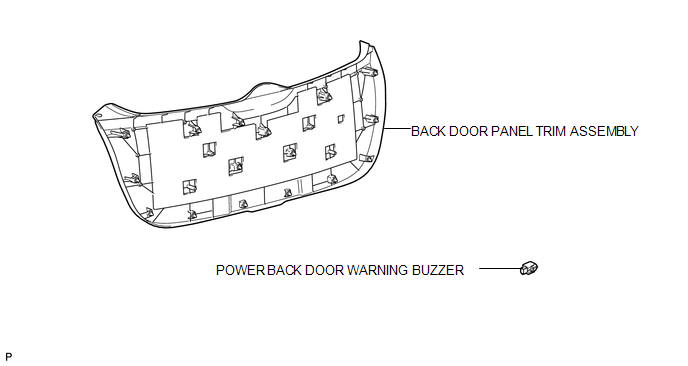
Inspection
INSPECTION
PROCEDURE
1. INSPECT POWER BACK DOOR WARNING BUZZER
|
(a) Measure the resistance according to the value(s) in the table below. HINT: If battery voltage is applied directly to the buzzer, the buzzer will not sound. Standard Resistance:
If the result is not as specified, replace the power back door warning buzzer. |
|
.png)
Removal
REMOVAL
PROCEDURE
1. REMOVE BACK DOOR PANEL TRIM ASSEMBLY
.gif)
2. REMOVE POWER BACK DOOR WARNING BUZZER
|
(a) Disconnect the connector. |
|
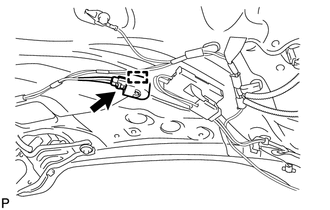
(b) Disengage the clamp to remove the power back door warning buzzer.
Installation
INSTALLATION
PROCEDURE
1. INSTALL POWER BACK DOOR WARNING BUZZER
|
(a) Engage the clamp to install the power back door warning buzzer. |
|
.png)
(b) Connect the connector.
2. INSTALL BACK DOOR PANEL TRIM ASSEMBLY
.gif)
 Power Back Door Touch Sensor
Components
COMPONENTS
ILLUSTRATION
Removal
REMOVAL
PROCEDURE
1. REMOVE UPPER BACK WINDOW PANEL TRIM
2. REMOVE BACK DOOR PANEL TRIM ASSEMBLY
3. DISCONNECT POWER BACK DOOR ROD (for L ...
 Rear Door
...
Other materials about Toyota Venza:
Replacement
REPLACEMENT
CAUTION / NOTICE / HINT
NOTICE:
Move the shift lever to P and apply the parking brake before bleeding
the brakes.
Add brake fluid to keep the level between the MIN and MAX lines of the
reservoir while bleeding the brakes.
...
Installation
INSTALLATION
CAUTION / NOTICE / HINT
NOTICE:
When disconnecting the steering intermediate shaft assembly and pinion shaft
of steering gear assembly, be sure to place matchmarks before servicing.
PROCEDURE
1. INSTALL TIE ROD ASSEMBLY LH
(a) I ...
Security Horn Circuit
DESCRIPTION
When the theft deterrent system is switched from the armed state to the alarm
sounding state, the main body ECU (driver side junction block assembly) controls
the security horn.
WIRING DIAGRAM
PROCEDURE
1.
PERFORM A ...

0.1601