
Toyota Venza: Power Back Door Control Switch
Components
COMPONENTS
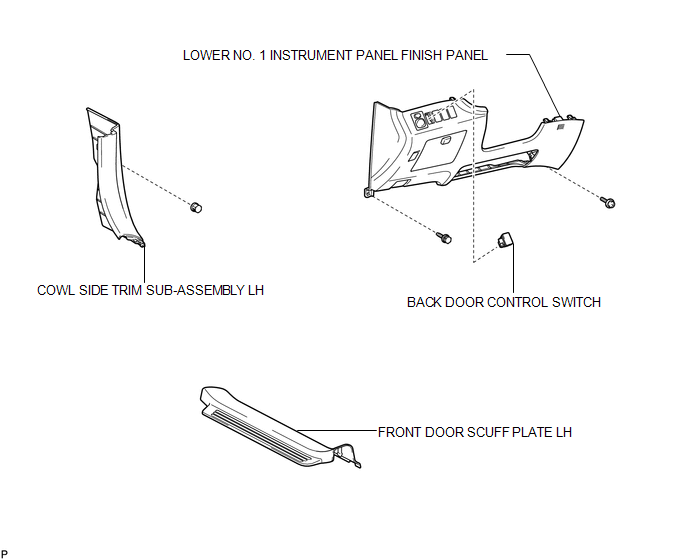
ILLUSTRATION
Inspection
INSPECTION
PROCEDURE
1. INSPECT POWER BACK DOOR OPENER / CLOSER SWITCH
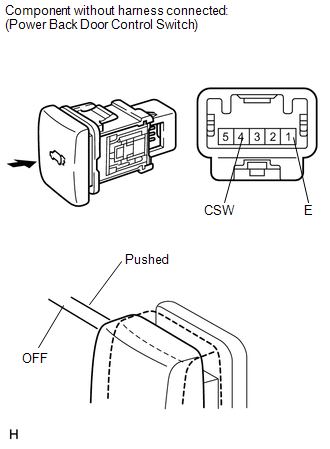
(a) Measure the resistance of the switch.
Standard resistance:
|
Tester Connection |
Condition |
Specified Condition |
|---|---|---|
|
1(E) - 4(CSW) |
Pushed (ON) |
Below 1 Ω |
|
1(E) - 4(CSW) |
Free (OFF) |
10 kΩ or higher |
If the result is not as specified, replace the switch.
(b) Check that the switch illuminates.
Standard resistance:
|
Measurement Condition |
Specified Condition |
|---|---|
|
Battery positive (+) → 3 (ILL+) Battery negative (-) → 2 (ILL-) |
Illuminates |
If the result is not as specified, replace the switch.
Removal
REMOVAL
PROCEDURE
1. REMOVE FRONT DOOR SCUFF PLATE LH
.gif)
2. REMOVE COWL SIDE TRIM SUB-ASSEMBLY LH
3. REMOVE LOWER NO. 1 INSTRUMENT PANEL FINISH PANEL
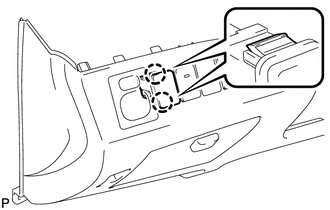
4. REMOVE BACK DOOR CONTROL SWITCH
|
(a) Disengage the 2 claws and remove the back door control switch. |
|
Installation
INSTALLATION
PROCEDURE
1. INSTALL BACK DOOR CONTROL SWITCH
|
(a) Engage the 2 claws to install the back door control switch. |
|
.png)
2. INSTALL LOWER NO. 1 INSTRUMENT PANEL FINISH PANEL
.gif)
3. INSTALL COWL SIDE TRIM SUB-ASSEMBLY LH
4. INSTALL FRONT DOOR SCUFF PLATE LH
 Power Back Door Closer Switch
Components
COMPONENTS
ILLUSTRATION
Removal
REMOVAL
PROCEDURE
1. REMOVE BACK DOOR PANEL TRIM ASSEMBLY
2. REMOVE POWER BACK DOOR CLOSER SWITCH ASSEMBLY
(a) Disconnect the con ...

Other materials about Toyota Venza:
Installation
INSTALLATION
PROCEDURE
1. INSTALL INSTRUMENT PANEL STAY
(a) Engage the 3 claws to install the 3 instrument panel stays.
2. INSTALL INSTRUMENT PANEL CLIP
(a) Engage the 2 claws to install ...
Problem Symptoms Table
PROBLEM SYMPTOMS TABLE
NOTICE:
After replacing the stereo component tuner assembly of vehicles subscribed to
pay-type satellite radio broadcasts, XM radio ID registration is necessary (w/ SDARS
System).
HINT:
Use the table below to help determi ...
Back Door Closer Switch Malfunction (B2251)
DESCRIPTION
The power back door ECU (power back door motor unit)*1 or back door closer ECU
(multiplex network door ECU)*2 receives signals from the latch switch, sector switch
and back door courtesy switch, which are built into the back door lock. Based o ...

0.1692