
Toyota Venza: Occupant Classification Ecu
Components
COMPONENTS
ILLUSTRATION
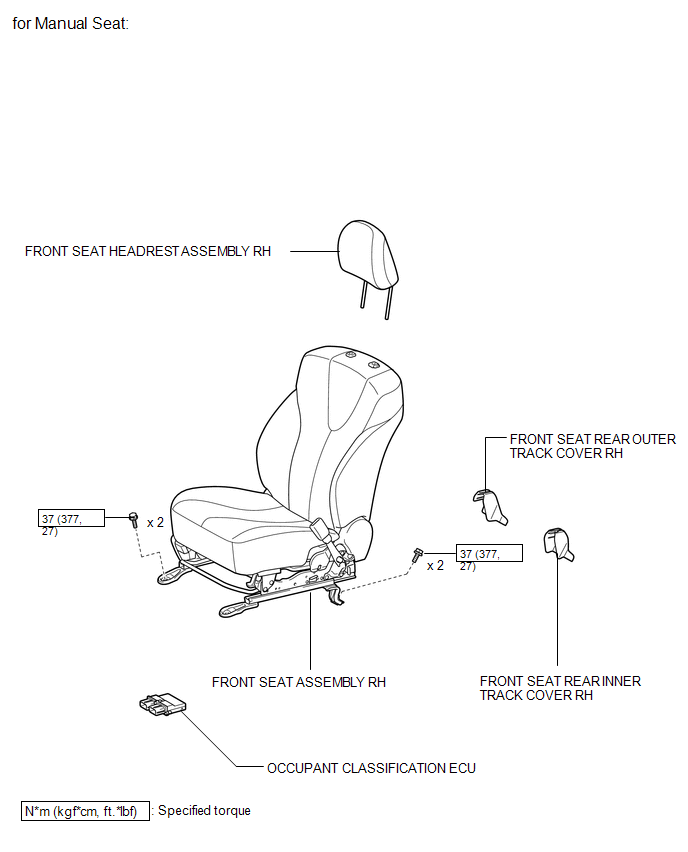
ILLUSTRATION
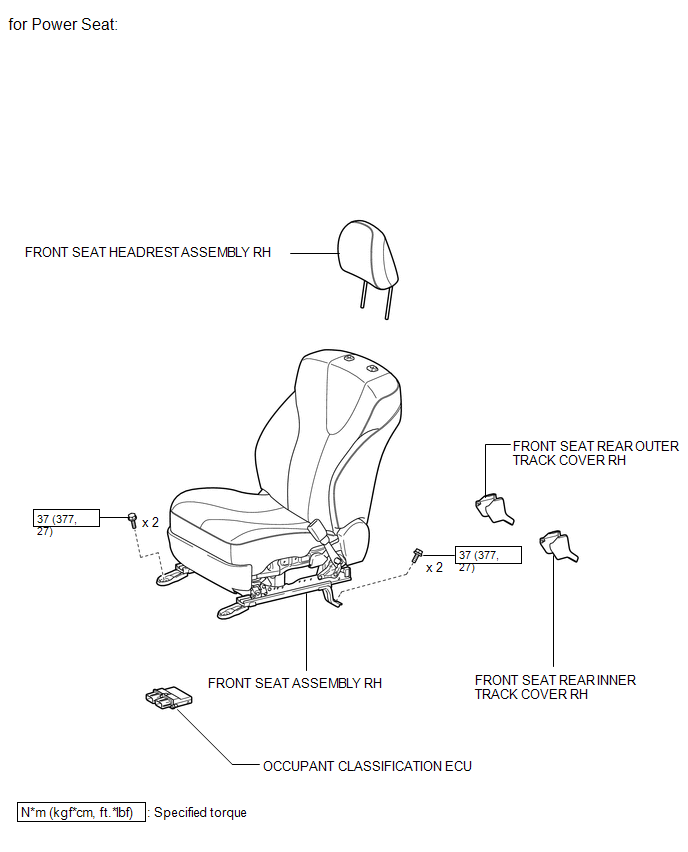
On-vehicle Inspection
ON-VEHICLE INSPECTION
CAUTION / NOTICE / HINT
CAUTION:
Be sure to follow the correct removal and installation procedures of the occupant classification ECU.
PROCEDURE
1. INSPECT OCCUPANT CLASSIFICATION ECU (VEHICLE NOT INVOLVED IN COLLISION)
(a) Perform a diagnostic system check (See page
.gif) ).
).
2. INSPECT OCCUPANT CLASSIFICATION ECU (VEHICLE INVOLVED IN COLLISION)
(a) Perform a diagnostic system check (See page
).
(b) Even if an airbag was not deployed, check if there is any damage to the occupant classification ECU. If there are any defects as mentioned below, replace the occupant classification ECU with a new one:
- Cracks, dents or chips on the case.
- Cracks or other damage to the connector.
Removal
REMOVAL
PROCEDURE
1. PRECAUTION
CAUTION:
Be sure to read Precaution thoroughly before servicing (See page
.gif) ).
).
2. REMOVE FRONT SEAT ASSEMBLY RH
HINT:
Use the same procedure for the RH side and the LH side.
for Manual Seat: (See page )
for Power Seat: (See page )
3. REMOVE OCCUPANT CLASSIFICATION ECU
|
(a) Disconnect the connector from the occupant classification ECU. Text in Illustration
|
|
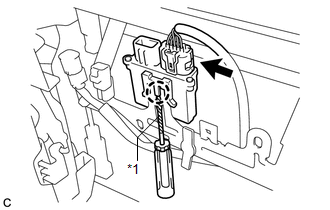
(b) Using a screwdriver with the tip wrapped with protective tape, disengage the claw to remove the occupant classification ECU.
Installation
INSTALLATION
PROCEDURE
1. INSTALL OCCUPANT CLASSIFICATION ECU
|
(a) Install the occupant classification ECU with the claw. NOTICE:
|
|
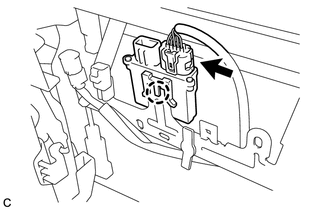
(b) Connect the connector.
2. INSTALL FRONT SEAT ASSEMBLY RH
HINT:
Use the same procedure for the RH side and the LH side.
for Manual Seat: (See page .gif) )
)
for Power Seat: (See page )
3. PERFORM DIAGNOSTIC SYSTEM CHECK
(a) Perform a diagnostic system check (See page
).
4. INSPECT SRS WARNING LIGHT
(a) Inspect the SRS warning light (See page
).
 Installation
INSTALLATION
PROCEDURE
1. INSTALL DRIVER SIDE KNEE AIRBAG ASSEMBLY
(a) Check that the ignition switch is off.
(b) Check that the cable is disconnected from the negative (-) battery terminal.
CAUT ...

Other materials about Toyota Venza:
PS Warning Light Remains ON
DESCRIPTION
If the power steering ECU detects a malfunction, the P/S warning light comes
on. At this time, the power steering ECU stores a DTC in its memory.
WIRING DIAGRAM
1. w/ Smart Key System
2. w/o Smart Key System
CAUTION / NOTICE / HINT
NOTI ...
Power Back Door Touch Sensor
Components
COMPONENTS
ILLUSTRATION
Removal
REMOVAL
PROCEDURE
1. REMOVE UPPER BACK WINDOW PANEL TRIM
2. REMOVE BACK DOOR PANEL TRIM ASSEMBLY
3. DISCONNECT POWER BACK DOOR ROD (for LH Side)
4. REMOVE BACK DOOR TRIM COVER
5. REMOVE POW ...
On-vehicle Inspection
ON-VEHICLE INSPECTION
CAUTION / NOTICE / HINT
CAUTION:
Be sure to follow the correct removal and installation procedures of the curtain
shield airbag assembly.
PROCEDURE
1. INSPECT CURTAIN SHIELD AIRBAG ASSEMBLY (VEHICLE NOT INVOLVED IN COLLISION)
(a) ...

0.1304