
Toyota Venza: Intuitive parking assist
The distance from your vehicle to nearby obstacles when parallel parking or maneuvering into a garage is measured by the sensors and communicated via the multi-information display and a buzzer.
Always check the surrounding area when using this system.
- Types of sensors
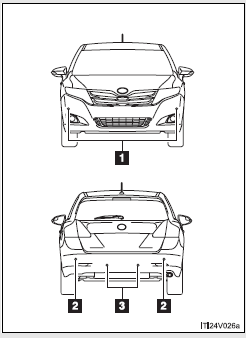
1. Front corner sensors
2. Rear corner sensors
3. Back sensors
- Intuitive parking assist switch
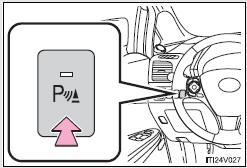
Turns Intuitive parking assist on/off
When on, the indicator light comes on to inform the driver that the system is operational.
 Cruise control
Use the cruise control to maintain a set speed without depressing the accelerator
pedal.
1. Indicators
2. Cruise control switch
- Set the vehicle speed
Press the “ON-OFF” button to ...
 Display
When the sensors detect an obstacle, a graphic is shown on the multi information
display depending on the position and distance to the obstacle.
1. Front corner sensor operation
2. Rear corner s ...
Other materials about Toyota Venza:
Fail-safe Chart
FAIL-SAFE CHART
1. Fail-safe
This function minimizes the loss of operation when any abnormality occurs in
a sensor or solenoid.
Fail-safe Control List
Malfunction Part
Function
Input Turbine Speed Sensor
...
How To Proceed With Troubleshooting
CAUTION / NOTICE / HINT
HINT:
*: Use the Techstream.
PROCEDURE
1.
VEHICLE BROUGHT TO WORKSHOP
NEXT
2.
CUSTOMER PROBLEM ANALYSIS
...
Components
COMPONENTS
ILLUSTRATION
ILLUSTRATION
ILLUSTRATION
ILLUSTRATION
ILLUSTRATION
...

0.139