
Toyota Venza: Installation
INSTALLATION
PROCEDURE
1. INSTALL REAR SEAT ASSEMBLY LH
(a) Place the rear seat assembly LH in the cabin.
NOTICE:
Be careful not to damage the vehicle body.
|
(b) Temporarily install the 2 bolts on the front side of the seat. |
|
.png)
|
(c) Temporarily install the 2 bolts on the rear side of the seat. |
|
.png)
(d) Install the rear seat assembly LH with the 4 bolts.
Torque:
37 N·m {377 kgf·cm, 27 ft·lbf}
2. CONNECT REAR SEAT NO. 2 RECLINING CONTROL CABLE SUB-ASSEMBLY
(a) Remove the rear seat No. 2 reclining control cable from the carpet hole.
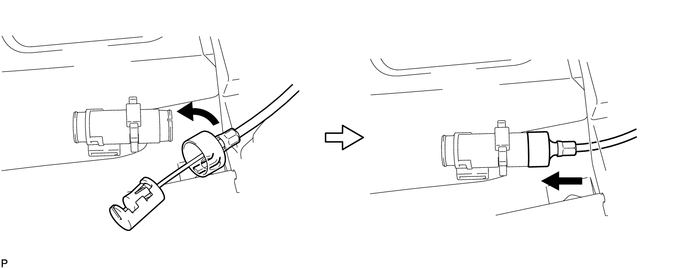
(b) Connect the rear seat No. 2 reclining control cable sub-assembly as shown in the illustration.
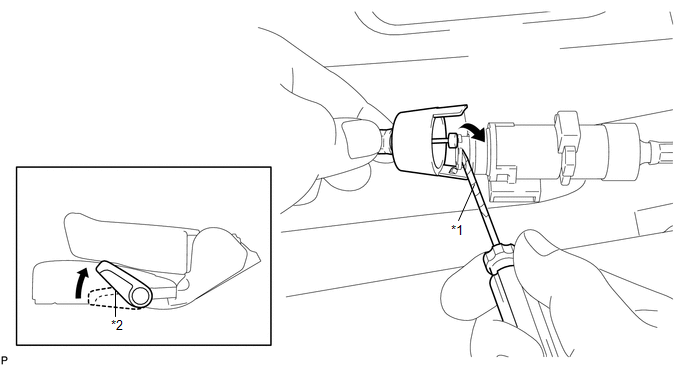 Text in Illustration
|
*1 |
Protective Tape |
*2 |
Seat Track Adjusting Handle |
|
(c) Engage the 2 claws and connect the rear seat No. 2 reclining control cable sub-assembly as shown in the illustration. |
|
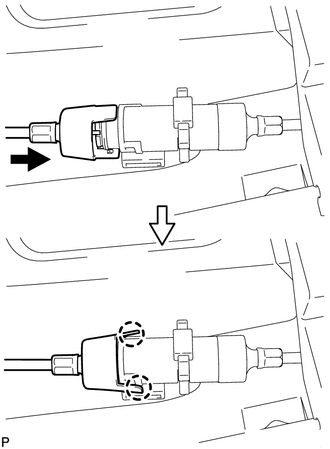
(d) Return the seatback to the upright position.
(e) Pull up the adjuster's lock piece to lock it as shown in the illustration.
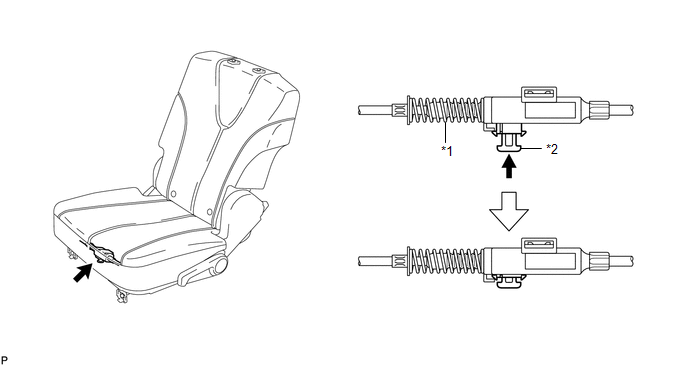 Text in Illustration
|
*1 |
Adjuster Spring |
*2 |
Lock Piece |
NOTICE:
When pressing the lock piece, make sure the adjuster's spring is not compressed.
3. INSTALL REAR SEAT OUTER TRACK BRACKET COVER
|
(a) Engage the guide and 3 claws and install the rear seat outer track bracket cover as shown in the illustration. |
|
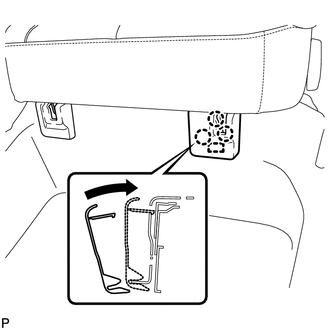
4. INSTALL REAR SEAT INNER TRACK BRACKET COVER
|
(a) Engage the guide and 3 claws and install the rear seat inner track bracket cover as shown in the illustration. |
|
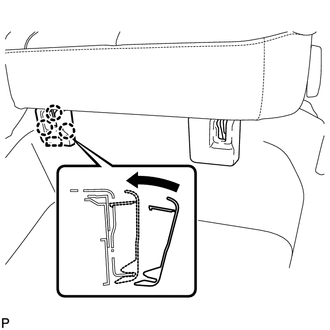
5. INSTALL REAR SEAT HEADREST ASSEMBLY
|
(a) Install the rear seat headrest assembly as shown in the illustration. |
|
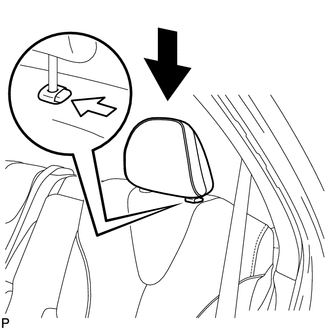
 Disassembly
DISASSEMBLY
PROCEDURE
1. REMOVE SEAT ADJUSTER COVER CAP LH
(a) Using a screwdriver wrapped with protective tape, disengage the 3
claws and remove the seat adjuster cover cap LH.
T ...

Other materials about Toyota Venza:
Ignition Coil And Spark Plug
Components
COMPONENTS
ILLUSTRATION
Removal
REMOVAL
PROCEDURE
1. REMOVE NO. 1 ENGINE COVER SUB-ASSEMBLY
2. REMOVE IGNITION COIL ASSEMBLY
(a) Disconnect the 4 ignition coil assembly connectors.
(b) Remove the 4 bolts and 4 ignition c ...
System Diagram
SYSTEM DIAGRAM
Communication Table
Sender
Receiver
Signal
Line
ECM
Main Body ECU (Driver Side Junction Block Assembly)
Transmission information
Park (P) st ...
On-vehicle Inspection
ON-VEHICLE INSPECTION
PROCEDURE
1. CONNECT TECHSTREAM
(a) Connect the Techstream to the DLC3.
(b) Start the engine and run it at idle.
(c) Enter the following menus: Chassis / ABS/VSC/TRAC / Active Test.
HINT:
Refer to the Techstream operator's manu ...

0.1368