
Toyota Venza: Inspection
INSPECTION
PROCEDURE
1. INSPECT PRELOAD
|
(a) Secure the steering column assembly in a vise. Text in Illustration
NOTICE: When using a vise, do not overtighten it. |
|
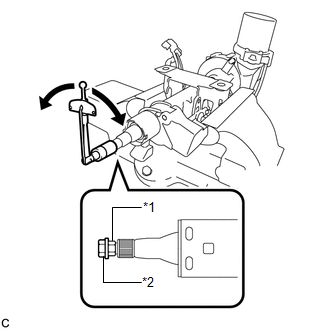
(b) Install a service nut to the steering main shaft.
Recommended service nut:
Thread diameter
12.0 mm (0.472 in.)
Thread pitch
1.25 mm (0.0492 in.)
(c) Install the steering wheel assembly set nut to the steering main shaft.
(d) Lock the steering wheel assembly set nut using the service nut.
(e) Using a torque wrench, turn the main shaft and measure the preload.
Torque:
Preload :
0.98-1.58 N·m {10-16 kgf·cm, 9-13 in·lbf}
If the preload is not as specified, replace the steering column assembly.
2. INSPECT STEERING LOCK OPERATION (w/o Smart Key System)
|
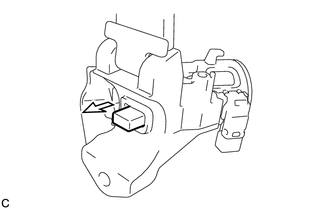
(a) Check that the steering lock mechanism is activated when the key is removed. |
|
|
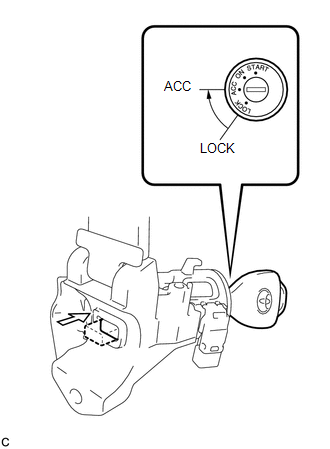
(b) Check that the steering lock mechanism is deactivated when the key is inserted and turned to the ACC position. HINT: If there is any abnormality, replace the ignition switch lock cylinder assembly or steering column upper bracket assembly. |
|
 Disassembly
DISASSEMBLY
CAUTION / NOTICE / HINT
NOTICE:
When using a vise, do not overtighten it.
PROCEDURE
1. REMOVE STEERING LOCK ACTUATOR ASSEMBLY (w/ Smart Key System)
(a) Secure the steering column ass ...
 Reassembly
REASSEMBLY
CAUTION / NOTICE / HINT
NOTICE:
When using a vise, do not overtighten it.
PROCEDURE
1. INSTALL STEERING LOCK ACTUATOR ASSEMBLY (w/ Smart Key System)
(a) Secure the steering column ass ...
Other materials about Toyota Venza:
Accessory Meter
Components
COMPONENTS
ILLUSTRATION
Installation
INSTALLATION
PROCEDURE
1. INSTALL ACCESSORY METER ASSEMBLY (w/o Rear View Monitor System)
(a) Connect the connector.
(b) Engage the 2 clamps ...
Precaution
PRECAUTION
1. PRECAUTION FOR DISCONNECTING CABLE FROM NEGATIVE BATTERY TERMINAL
NOTICE:
When disconnecting the cable from the negative (-) battery terminal, initialize
the following systems after the terminal is reconnected.
System Name
...
Front Passenger Side Door Entry Unlock Function does not Operate
DESCRIPTION
If the front passenger door entry lock function operates normally, but its entry
unlock function does not, this means that the request code from the front passenger
door is being output normally. In this case, a malfunction in the touch sensor ...

0.1356