
Toyota Venza: Front seats
► Power seat
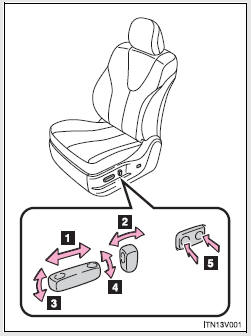
1. Seat position fore/aft control switch 2. Seatback angle control switch 3. Seat cushion (front) angle control switch (driver’s side only) 4. Vertical height control switch (driver’s side only) 5. Lumbar support control switch
► Manual seat
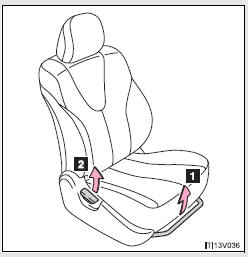
1. Seat position fore/aft adjustment lever 2. Seatback angle adjustment lever
Active head restraints
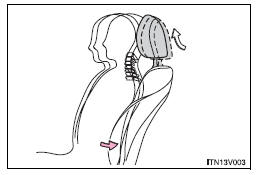
When the occupant’s lower back presses against the seatback during a rear-end collision, the head restraint moves slightly forward and upward to help reduce the risk of whiplash on the seat occupant.
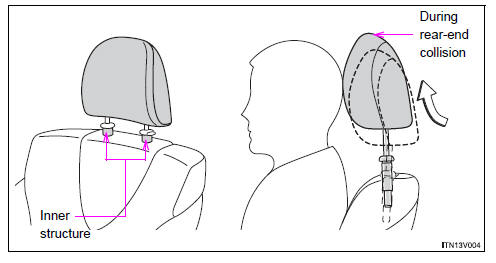
- Active head restraints
Even small forces applied to the seatback may cause the head restraint to move. Pushing up a locked head restraint forcibly may make the inner structure of the head restraint appear. This does not indicate a problem.
CAUTION
- Seat adjustment
• Be careful that the seat does not hit passengers or luggage.
• Do not recline the seat more than necessary when the vehicle is in motion to reduce the risk of sliding under the lap belt.
If the seat is too reclined, during an accident the lap belt may slide past the hips and apply restraint forces directly to the abdomen or your neck may contact the shoulder belt, increasing the risk of death or serious injury.
• Manual seat only: After adjusting the seat, make sure that the seat is locked in position.

 Rear seats
Seatback angle adjustment lever
Pull up the lever until the lock is completely released.
Folding down the rear seatbacks
- Before folding down the rear seatbacks
Stow the seat belt buckl ...
Other materials about Toyota Venza:
Navigation Antenna
Components
COMPONENTS
ILLUSTRATION
Removal
REMOVAL
PROCEDURE
1. REMOVE INSTRUMENT PANEL SAFETY PAD ASSEMBLY
HINT:
Refer to the procedure up to Remove Instrument Panel Safety Pad Assembly (See
page ).
2. REMOVE NO. 1 SIDE DEFROSTER NOZZLE DUCT ...
Interior Light Auto Cut Circuit
DESCRIPTION
When battery saving control operates while the interior lights are on, the main
body ECU (driver side junction block assembly) opens the DOME CUT relay to turn
off the lights.
WIRING DIAGRAM
CAUTION / NOTICE / HINT
NOTICE:
Inspect the fu ...
Precaution
PRECAUTION
NOTICE:
When disconnecting the cable from the negative (-) battery terminal, initialize
the following systems after the cable is reconnected.
System Name
See Procedure
Back Door Closer System
...

0.1619