
Toyota Venza: Components
COMPONENTS
ILLUSTRATION
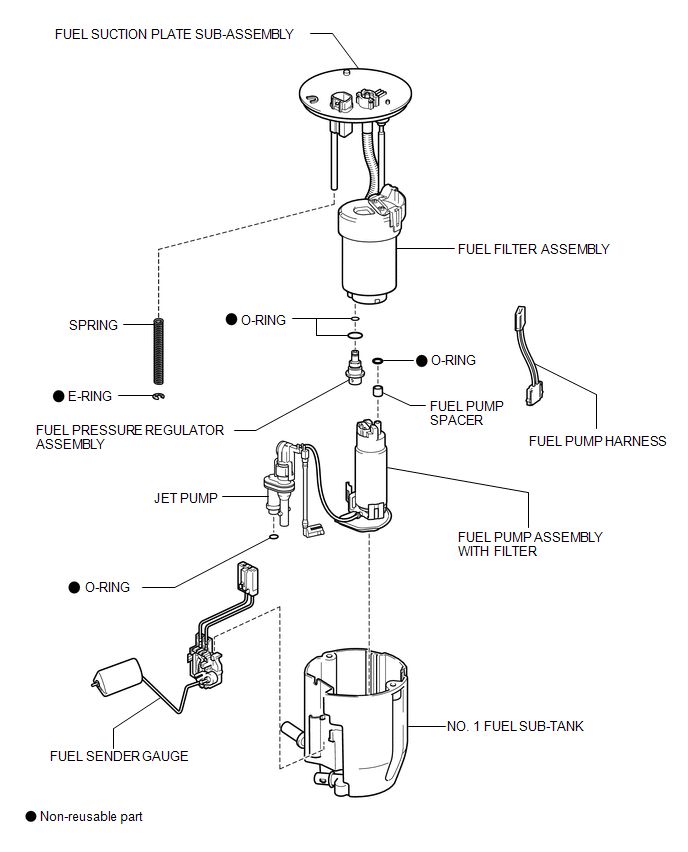

 Removal
REMOVAL
PROCEDURE
1. REMOVE FUEL SUCTION TUBE ASSEMBLY WITH PUMP AND GAUGE
(a) Remove the fuel suction tube assembly with pump and gauge (See page
).
2. REMOVE FUEL SENDER GAUGE
3. REMOVE FU ...
Other materials about Toyota Venza:
Front Sensor Communication Malfunction (C1AEC)
DESCRIPTION
This DTC is stored when there is an open or short circuit in the communication
line between the front sensors and the ECU, or when there is a malfunction in a
front sensor.
DTC No.
DTC Detection Condition
Trou ...
Removal
REMOVAL
CAUTION / NOTICE / HINT
NOTICE:
w/Camera mirror:The timing of the change between high beams and low beams differs
depending on the light transmission rate of the glass. For this reason, when replacing
the windshield, replace it with an original ...
Entry Interior Alarm does not Sound
DESCRIPTION
The smart key system uses the combination meter buzzer to perform various vehicle
interior warnings. When the conditions for each warning are met, the certification
ECU (smart key ECU assembly) sends a buzzer signal to the combination meter as ...

0.1351