
Toyota Venza: Actuator Check
ACTUATOR CHECK
1. ACTUATOR CHECK
(a) Start the engine and warm it up.
(b) Perform the indicator check (See page .gif)
).
(c) Press the "Recirculation/Fresh" switch to perform the actuator check.
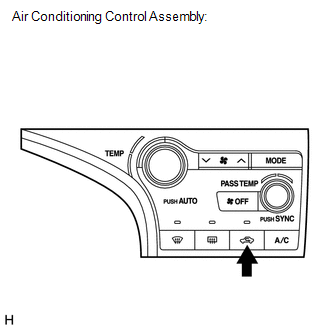
HINT:
Be sure to perform the actuator check after starting the engine.
Text in Illustration|
*1 |
Air Conditioning Control Assembly |
(d) As the actuator check is repeated from steps 1 to 10 at 1 second intervals, check the temperature and air flow visually and by hand.
.png)
HINT:
- The display blinks at 1 second intervals in the step operation.
- Press the "OFF" switch to finish panel diagnosis.
- Press the "AUTO" switch to enter sensor check mode.
|
*1 |
Accessory Meter Assembly (TFT) |
|
*2 |
Accessory Meter Assembly (LCD) |
|
*3 |
Display Code |
|
Step No. |
Display Code |
Condition |
||||
|---|---|---|---|---|---|---|
|
Blower Level |
Air Mix Damper |
Airflow Vent |
Air Inlet Damper |
Compressor |
||
|
1 |
0 |
0 |
0% open |
FACE |
FRESH |
off |
|
2 |
1 |
1 |
0% open |
FACE |
FRESH |
off |
|
3 |
2 |
17 |
0% open |
FACE |
RECIRCULATION/FRESH |
on |
|
4 |
3 |
17 |
0% open |
FACE |
RECIRCULATION |
on |
|
5 |
4 |
17 |
50% open |
B/L |
RECIRCULATION |
on |
|
6 |
5 |
17 |
50% open |
B/L |
RECIRCULATION |
on |
|
7 |
6 |
17 |
50% open |
FOOT |
FRESH |
on |
|
8 |
7 |
17 |
100% open |
FOOT-0 |
FRESH |
on |
|
9 |
8 |
17 |
100% open |
F/D |
FRESH |
on |
|
10 |
9 |
31 |
100% open |
DEF |
FRESH |
on |
(e) If the steps are difficult to read because they change automatically, press the "MODE" switch to display the steps one at a time so that they can be read easily. The items are displayed step by step each time the "MODE" switch is pressed.
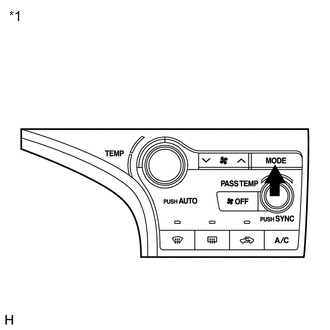
HINT:
- Press the "OFF" switch to finish panel diagnosis.
- Press the "Recirculation/Fresh" switch to enter sensor check mode.
|
*1 |
Air Conditioning Control Assembly |
 Diagnostic Trouble Code Chart
DIAGNOSTIC TROUBLE CODE CHART
HINT:
When the air conditioning system functions properly, DTC B1400/00 is output.
Air Conditioning System
DTC Code
Detection Item
Tr ...
 Lost Communication with ECM (U0100-U0142,U0155)
DESCRIPTION
DTC No.
DTC Detecting Condition
Trouble Area
U0100
No communication with ECM
CAN communication system
...
Other materials about Toyota Venza:
Voice Guidance does not Function
PROCEDURE
1.
CHECK VOICE GUIDANCE SETTING
(a) Check that the voice guidance setting is not off.
OK:
Voice guidance setting is not off.
NG
CHANGE THE VOICE GUIDANCE SETTING TO ON
...
Installation
INSTALLATION
PROCEDURE
1. INSTALL BRAKE MASTER CYLINDER SUB-ASSEMBLY
NOTICE:
When install a new brake master cylinder sub-assembly, remove the protectors
from the piston and outlet ports.
(a) Install a new O-ring to the brake master cylinder sub-assembl ...
System Diagram
SYSTEM DIAGRAM
Communication Method
Transmitting ECU
Receiver
Signal
Communication Method
Main body ECU (Driver Side Junction Block Assembly)
Power back door ECU (Power back door motor ...

0.1299